No-Code and Low-Code Build
A drag-and-drop design studio lets teams build and update sites without deep coding, then extend with code where it counts.

 17+ Years of
Quickly and easily build secure, data-driven websites and portals on the Microsoft cloud. TrellisPoint is a Microsoft Power Pages implementation partner that helps you launch customer, partner, and self-service sites that connect straight to your business data.

Microsoft Power Pages is a low-code platform in the Power Platform for building secure, external-facing business websites and portals. Sites connect directly to your data in Microsoft Dataverse, so customers, partners, and employees see the right information, with the same identity, security, and admin model as the rest of your Microsoft cloud.
Six capabilities that show up across every Power Pages site, from a simple FAQ portal to a full customer self-service experience.
A drag-and-drop design studio lets teams build and update sites without deep coding, then extend with code where it counts.
Define roles and permissions so sensitive content is only visible to authorized users, with secure sign-in built in.
See site performance, user behavior, and engagement metrics so decisions about your portal are grounded in data.
Optimize pages for search so your content is discoverable, ranks well, and drives traffic to the experiences you publish.
Sites render cleanly across phones, tablets, and desktops, so every visitor gets a consistent, responsive experience.
Customizable themes, fonts, and color schemes keep every page on-brand and consistent across the whole site.
Four core building blocks that come together to make Power Pages a fast path from idea to a live, secure site.
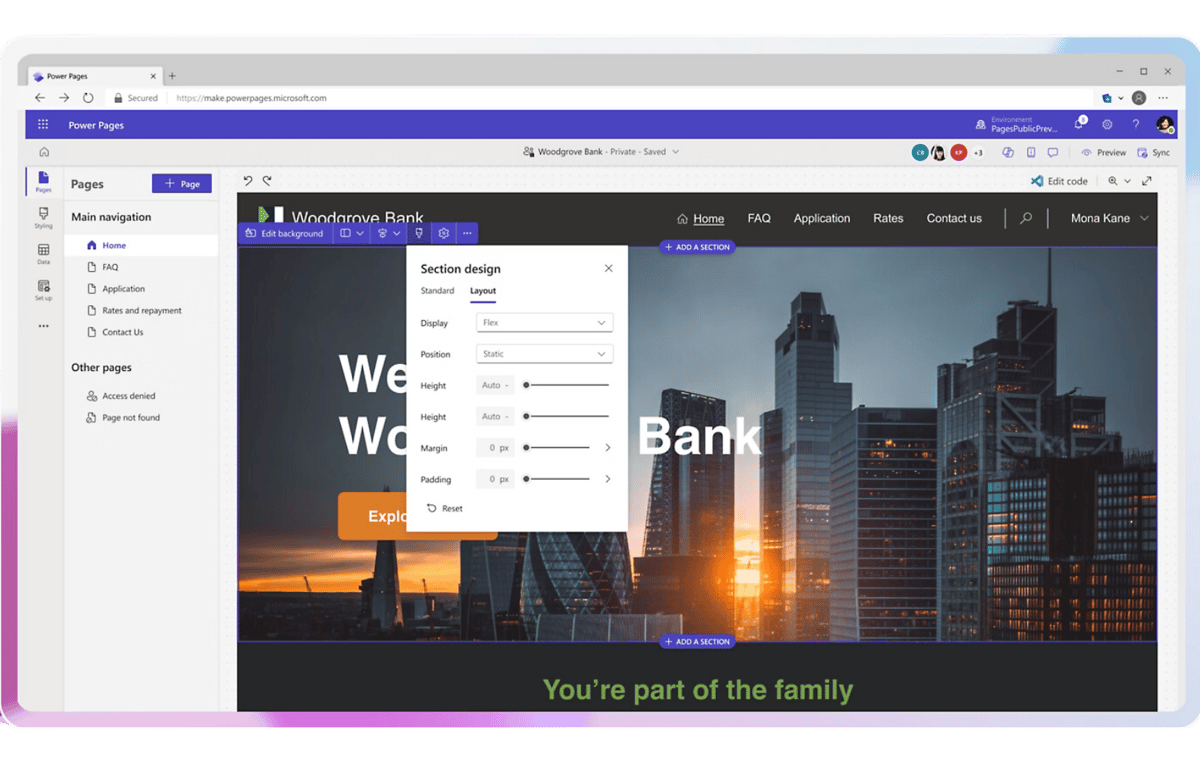
Drag-and-drop design with no-code components including images, videos, lists, and forms.
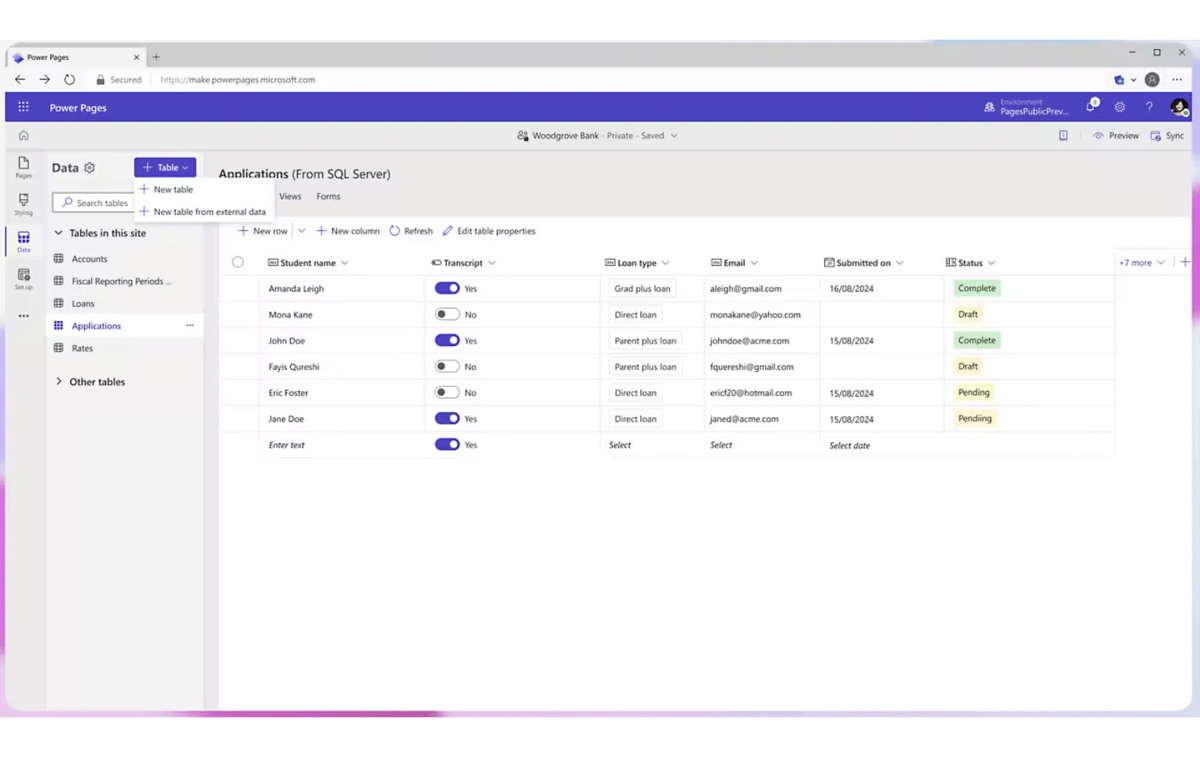
Store and manage your business data in Microsoft Dataverse and build tables from the data workspace.
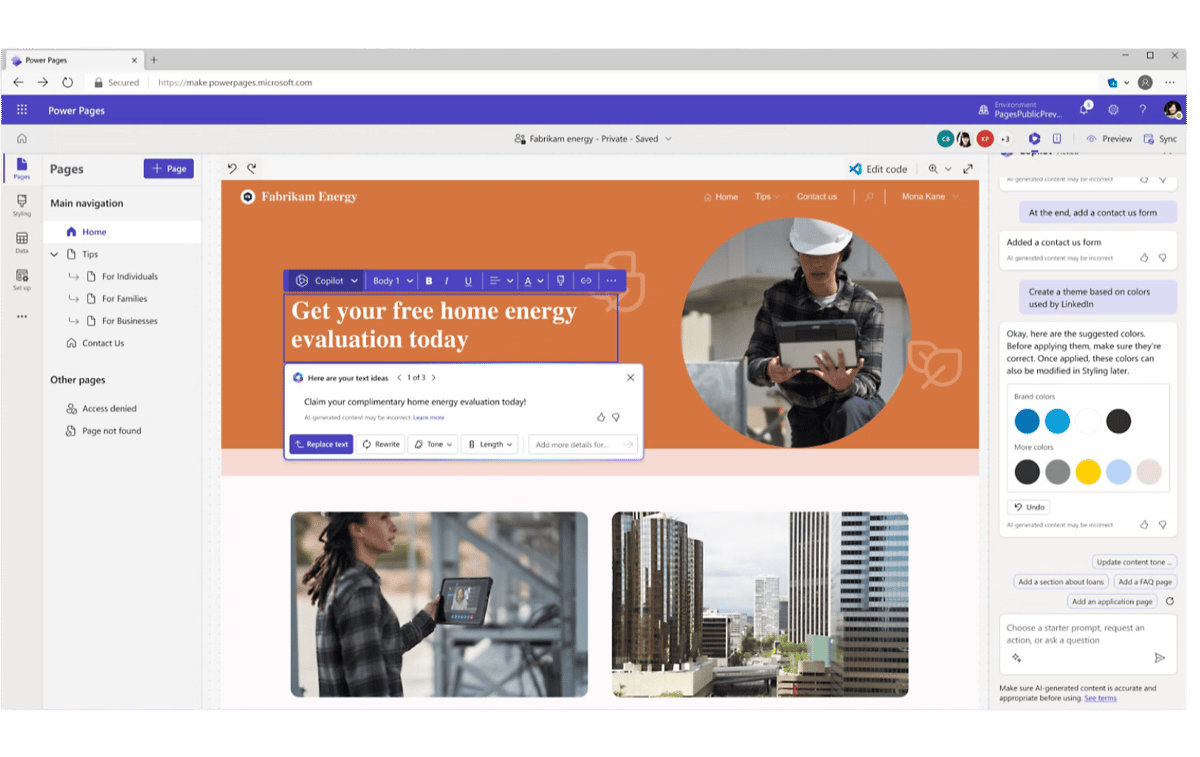
Create layouts, smart sitemaps, and compelling AI-generated copy with Copilot.
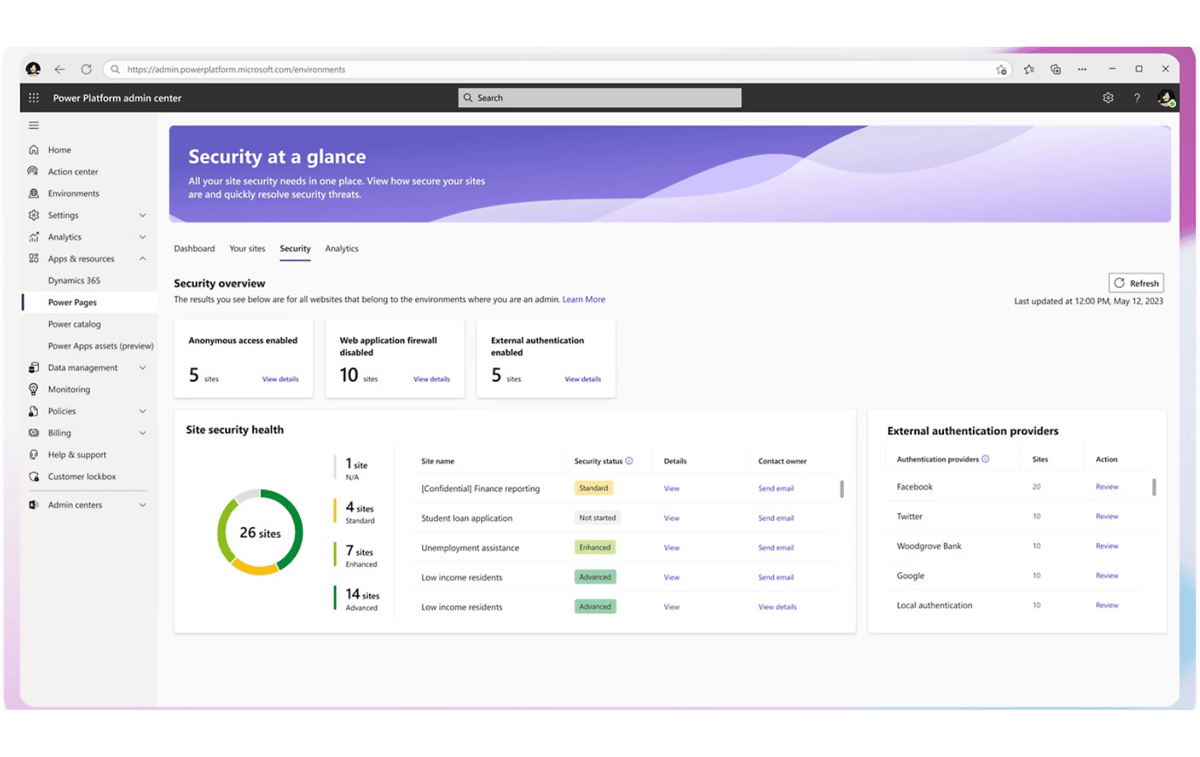
Run dynamic security testing scans that simulate attacks like injection and cross-site scripting, with guidance to fix what they find.
Power Pages gives each group what their day needs. Managers get control and visibility. Teams get a site they can maintain without waiting on developers.
Most Power Pages projects start with one of these three patterns, then grow as the data behind them proves its value.
Publish FAQ pages for products, services, policies, and procedures across every industry vertical you serve.
Stand up portals for warranty registration, support inquiries, appointment booking, and account management.
Give partners portals for supplier onboarding, sustainability tracking, order management, and vendor support.
Power Pages pulls from the systems your business already uses, so the site shows live, accurate data instead of a stale copy.

Store and manage data securely in a unified data model, so information stays consistent and accurate across every web application.

Pull CRM and ERP data from Dynamics 365 to power customer portals, service request forms, and data-driven dashboards.

Embed SharePoint libraries and lists to bring document sharing, collaboration, and content management into your site.
.png?width=64&height=64&name=power%20bi%20(1).png)
Embed interactive Power BI reports and dashboards so visitors can explore real-time data right on the page.

TrellisPoint is a Microsoft Solutions Partner with 17+ years of Microsoft implementation experience. We take Power Pages from an idea to a live, secure site, then keep it producing value as your needs grow.
Power Pages works best alongside the other Power Platform tools. Start here, then see the latest from our blog.
Loading recent posts...
Whether you are scoping your first portal, replacing an aging website, or trying to get more out of the data behind an existing site, we start with outcomes, not products. Share your goals and we will respond with practical next steps tailored to your environment.
Prefer to talk? Call (888) 719-0248.
If you do not see your question here, contact us and we will walk through your specific environment.
Microsoft Power Pages is a low-code platform, part of the Microsoft Power Platform, for building secure, external-facing websites and portals. Sites connect directly to business data stored in Microsoft Dataverse, so you can give customers, partners, and employees a branded experience that shows live, role-appropriate information without standing up a custom web application from scratch.
Power Pages lets you publish data-driven sites quickly and keep them current with less effort. Because pages read directly from your business systems, visitors see accurate information in real time, and built-in SEO tools help that content rank and get found. The result is a more professional, responsive web presence that your team can maintain without a dedicated development cycle for every change.
Yes. Power Pages includes customizable templates, themes, fonts, and color schemes so you can match your brand across every page. The drag-and-drop studio handles most layout work with no code, and developers can extend pages with custom code, components, and logic when a requirement calls for it. That mix lets non-technical users manage day-to-day content while still supporting advanced customization.
Power Pages is built on Microsoft Dataverse and integrates natively with Dynamics 365, SharePoint, Power BI, and the rest of Microsoft 365 and Azure. You can pull CRM and ERP data into pages, embed SharePoint libraries and lists, and surface interactive Power BI dashboards. For non-Microsoft systems, TrellisPoint connects Power Pages through the Power Platform and Azure so the site reflects the data you already run on.
Power Pages runs on Microsoft's security infrastructure with integrated authentication and authorization. You define roles and permissions to control access to content, so sensitive information is only visible to authorized users. The platform also supports dynamic security testing scans that simulate attacks like injection and cross-site scripting, then provide guidance on fixing any vulnerabilities found before the site goes live.
Yes. Sites built with Power Pages are optimized for mobile devices, so visitors get a clean, responsive experience whether they arrive on a phone, tablet, or desktop. Responsive behavior is part of the platform rather than something you have to build separately for each layout.
Power Pages reduces the need for extensive custom coding and specialized development resources, which lowers both the cost and the time to launch. Sites connect straight to your Dataverse data, security and identity are inherited from the Microsoft cloud, and non-technical team members can maintain content. Compared with a fully custom site, you get faster delivery, easier upkeep, and tighter integration with the Microsoft tools you already use.
Yes. Power Pages supports both anonymous external sites and authenticated portals for known users. You can publish public pages such as FAQs and marketing content, and you can gate areas behind sign-in for customers, partners, or employees using roles and permissions. That makes it a fit for customer self-service portals, partner and vendor management sites, and internal-facing resource hubs alike.