Skip to content
TrellisPoint
Dynamics 365 Overview → D365 Accelerators Customer Insights Business Central Customer Service Customer Voice Sales Field Service Project Operations Power Platform Overview → Power BI Power Apps Power Automate Power Pages Copilot & AI Overview → AI Value Engine Copilot Studio Copilot for Service Copilot for Sales Azure Solutions
Microsoft Solutions Partner 17+ Years of
Implementation Experience
Contact Us
Microsoft Dynamics 365

Microsoft Dynamics 365 Customer Service

Omnichannel support, AI-driven case management, and the self-service tools your team needs to resolve issues faster. TrellisPoint helps you go live on Dynamics 365 Customer Service and deliver exceptional customer experiences from day one.

Support agent resolving a case in Dynamics 365 Customer Service
What Is Dynamics 365 Customer Service?

A support platform built to resolve issues, not just log them

Microsoft Dynamics 365 Customer Service is a cloud-based platform that helps support teams deliver faster, more consistent service across every channel. It unifies case management, omnichannel engagement, a shared knowledge base, and AI-driven insights so agents resolve issues quickly and customers can help themselves when they prefer. Copilot and AI virtual agents are built in, so automation and agent assistance are active alongside the core platform rather than added later.

Omnichannel engagement
Email, chat, voice, SMS, and social handled in one workspace, so context follows the customer.
AI-driven insights
Copilot summaries, sentiment, and supervisor analytics surface what to act on, not just what happened.
Case management
Structured case lifecycle with automated routing, SLAs, and escalation rules built in.
Self-service capabilities
Customer portals, knowledge articles, and virtual agents deflect routine questions automatically.
SLA management
Define, monitor, and proactively alert on service level agreements so commitments are met consistently.
Knowledge base
A shared knowledge base gives agents accurate answers fast and powers self-service deflection.

Capabilities

What Dynamics 365 Customer Service lets your team do

Six capabilities that show up in every support team's daily workflow. Each one moves a case forward: from the channel it arrives on to first response to resolution.

Omnichannel Engagement

Meet customers on their preferred channel, including email, chat, voice, SMS, social, and virtual assistant, all from one agent workspace.

AI-Powered Virtual Agents

Virtual agents handle routine inquiries and provide instant responses, freeing your team to focus on complex, high-value issues.

Case Management

A structured case lifecycle with automated workflows, SLA tracking, and rule-based escalations keeps every issue moving to resolution.

Knowledge Base

Agents find accurate answers fast through an integrated knowledge base that also powers customer self-service deflection.

AI-Based Routing

Increase first-call resolution with AI routing that classifies each issue and assigns it to the best-suited agent automatically.

Self-Service Portals

Branded portals and AI assistants let customers track cases, find answers, and resolve common issues without waiting for an agent.

See It in Action

What agents and supervisors use day to day

Four capabilities that come together to make Dynamics 365 Customer Service the place support teams actually work, rather than a system they route around.

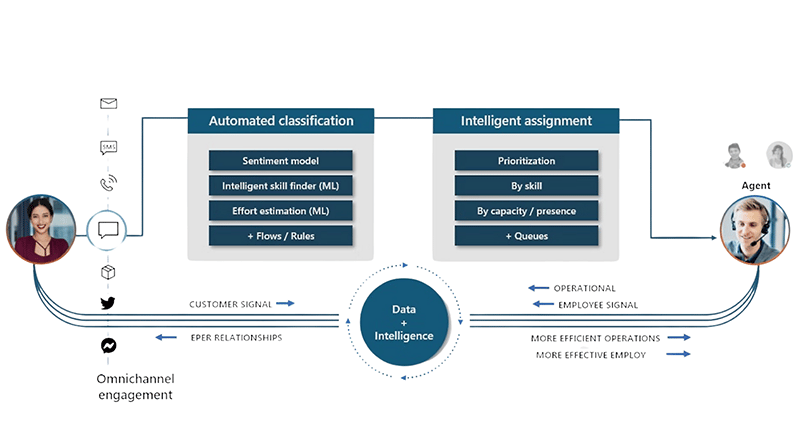
Dynamics 365 Customer Service AI-based agent routing
Connect With the Right Agent

Increase first-call resolution with AI-based routing that classifies issues and assigns them to the best-suited agent.

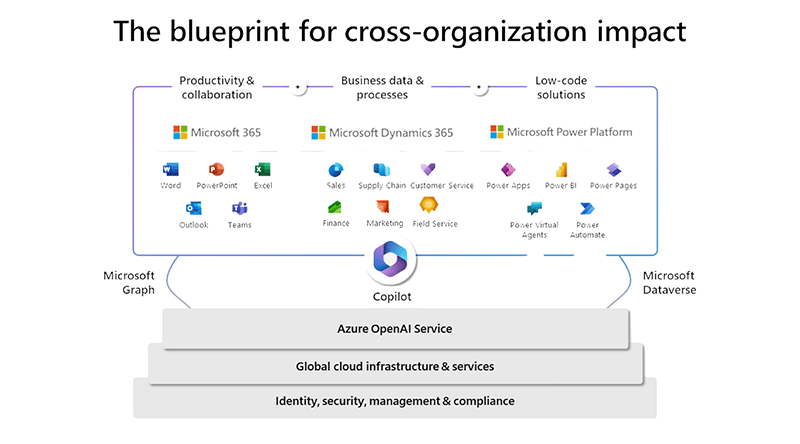
Dynamics 365 Customer Service open and extensible platform
Build on an Open, Extensible Platform

Reduce costs by building on existing capabilities and interoperating with your other business applications, all on a single platform.

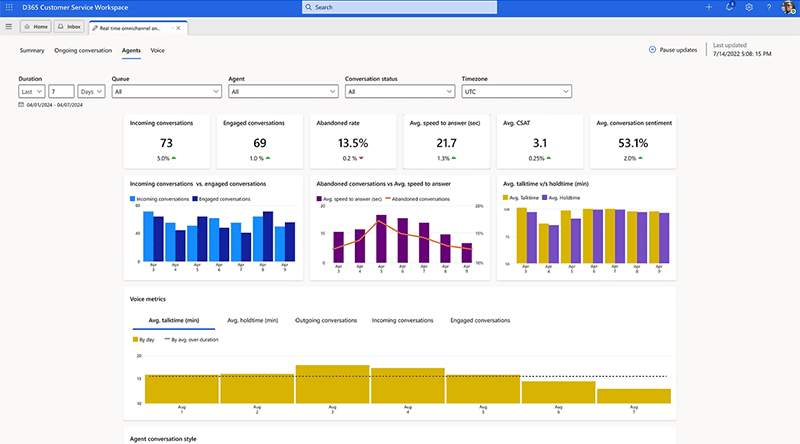
Dynamics 365 Customer Service supervisor insights dashboard
Get Supervisor Insights

An omnichannel insights dashboard puts AI-driven conversation and channel analytics, plus KPIs, all in one place.

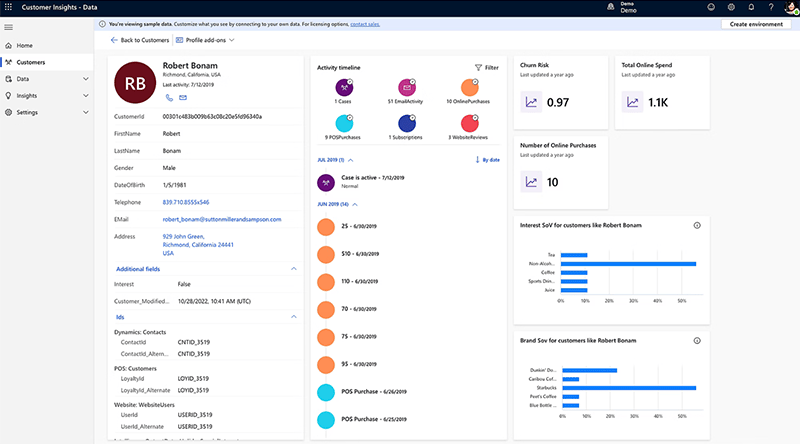
Dynamics 365 Customer Service customer journey insights
Learn Customers' Journeys

Gain insight from customer interactions and journeys to personalize offers, recommendations, and follow-up.

Who It's For

Service Managers and Support Teams, working from the same system

Both groups get tools tuned for their day. Managers see what to coach and where SLAs are at risk. Agents see the full customer context and what to do next.

For Service Managers

  • SLA management with proactive alerts and notifications on potential breaches
  • Real-time analytics and customizable dashboards to track KPIs and team performance
  • Workforce optimization with scheduling, workload balancing, and performance tracking
  • A 360-degree view of customer interactions to anticipate needs and spot trends
  • Customer satisfaction (CSAT) metrics and feedback to improve the experience

For Support Teams

  • Knowledge base integration so agents find accurate answers and resolve issues faster
  • AI-powered virtual agents that handle routine inquiries and provide instant responses
  • Case collaboration with teammates and experts to resolve complex issues efficiently
  • Automated workflows and escalations based on predefined rules
  • A customer timeline view with case trends, resolution times, and history in one place
The Economic Impact

What Dynamics 365 Customer Service delivers

Independent Forrester Total Economic Impact research found that AI-assisted case management and automation produce measurable returns for organizations that adopt Dynamics 365 Customer Service.

315%
Return on investment over three years
40%
Reduction in average handling time
20%
Improvement in first-call resolution
15%
Decrease in case misroutes
Microsoft Stack Integrations

Native integration with the tools you already use

Dynamics 365 Customer Service sits inside the same Microsoft cloud as Office, Teams, LinkedIn, and Azure. Integration is configuration, not custom development.

Microsoft 365 and Office

Sync email and calendar with Outlook, collaborate in real time in Teams, and surface advanced reporting with Power BI, all tied to the customer record.

LinkedIn Sales Navigator

Account and contact intelligence renders inside the case record, so agents engage with customers in context without leaving Dynamics.

Azure and Power Platform

Use Azure AI for predictive insights while Power Platform tools like Power BI, Power Automate, and Power Apps streamline workflows and enable custom apps.

Business Central and Field Service

Coordinate back-office finance and inventory with real-time field service operations alongside Business Central.

TrellisPoint Dynamics 365 Customer Service delivery team
How TrellisPoint Helps

Our Dynamics 365 Customer Service services

TrellisPoint is a Microsoft Solutions Partner with 17+ years of Dynamics 365 implementation experience. We help you go from license to live, then keep the platform producing value as your service operation grows.

Full configuration, data migration, training, and go-live support.
Omnichannel Setup
Stand up email, chat, voice, SMS, and social channels in one unified agent workspace.
Knowledge Base and Self-Service
Build out portals, knowledge articles, and virtual agents that deflect routine volume.
Legacy Platform Migration
Move from a legacy help desk or on-prem CRM with data, history, and process intact.
Power Platform Integration
Extend the platform with Power BI dashboards, Power Automate flows, and custom Power Apps.
Take Copilot and AI virtual agents beyond the defaults with structured rollout, governance, and ROI measurement.
Start Here

Talk With a Dynamics 365 Customer Service Specialist

Whether you are evaluating Dynamics 365 Customer Service for the first time, planning a migration off a legacy help desk, or trying to get more value out of an existing platform, we start with outcomes, not products. Share your goals and we will respond with practical next steps tailored to your environment.

  • A direct conversation with a senior consultant focused on your objectives
  • Clear, outcome-driven recommendations aligned to your service goals
  • A practical roadmap outlining scope, timeline, and next steps

Prefer to talk? Call (888) 719-0248.

 
Frequently Asked Questions

Dynamics 365 Customer Service FAQ

If you do not see your question here, contact us and we will walk through your specific environment.

What is Microsoft Dynamics 365 Customer Service?

Microsoft Dynamics 365 Customer Service is a cloud-based platform that helps support teams deliver consistent service across every channel. It centralizes case management, omnichannel engagement (email, chat, voice, SMS, social), a shared knowledge base, and self-service portals in one system, with AI-assisted tools through Copilot and virtual agents built in. Managers get SLA management, real-time analytics, and CSAT insights; agents get the full customer timeline, knowledge, and AI-suggested actions that reduce handling time.

How can Dynamics 365 Customer Service improve my customer service operations?

It improves operations by automating routine work (case routing, escalations, follow-ups), deflecting common questions through self-service and virtual agents, and giving agents the knowledge and context to resolve issues faster. Managers gain real-time visibility into SLAs, workload, and CSAT, so they can balance staffing and coach against real conversation data. Forrester Total Economic Impact research has measured outcomes including a 40% reduction in average handling time, a 20% improvement in first-call resolution, and a 15% decrease in misroutes for organizations adopting the platform.

Is Dynamics 365 Customer Service customizable?

Yes. The platform is highly configurable, from case forms, queues, routing rules, and SLA definitions to dashboards and automated workflows. Built on an open, extensible platform, it lets you build on existing capabilities and interoperate with other business applications without leaving the Microsoft cloud. For deeper requirements, TrellisPoint extends it with Power Apps, Power Automate, and Azure services so the system matches your service model rather than forcing you to change it.

How does Dynamics 365 Customer Service integrate with other systems?

Native integration is included for Microsoft 365 (Outlook, Teams, Word, Excel), Power BI, LinkedIn Sales Navigator, Azure data services, and the Power Platform (Power Automate, Power Apps). It also coordinates with Business Central for finance and inventory and with Field Service for on-site work. For non-Microsoft systems, TrellisPoint configures pre-built connectors or builds custom integrations through Azure and the Power Platform.

What kind of support does TrellisPoint provide after implementation?

TrellisPoint provides ongoing support after go-live, including admin assistance, enhancements, user training, and help adopting new features as Microsoft releases them. Our support plans give you a predictable way to keep the platform healthy and evolving as your service operation grows, so the system keeps producing value well past launch.

How does Dynamics 365 Customer Service help in data management?

It provides a unified, 360-degree view of every customer by consolidating interactions across all channels into one timeline. Cases, conversations, and history live in a single record, so agents stop hunting across systems and managers get clean data for analytics and reporting. Built on the Microsoft cloud, it carries the same security, role-based access, and compliance posture as the rest of your stack, and connects to Power BI and Azure for deeper analysis.

What AI capabilities are included in Dynamics 365 Customer Service?

The platform includes Copilot for agent assistance (case summaries, drafted responses, and knowledge lookups), AI-powered virtual agents that resolve routine inquiries, AI-based routing that classifies and assigns cases to the best-suited agent, and supervisor insights with conversation and sentiment analytics. Most of these capabilities are activated through licensing and configuration rather than custom development.