D365 projects stall when scope balloons before anyone touches the system. We help you pick the right Accelerator for your team, commit to a fixed price and timeline, and get Copilot in front of your users on day one.
D365 projects stall when scope balloons before anyone touches the system. We help you pick the right Accelerator for your team, commit to a fixed price and timeline, and get Copilot in front of your users on day one.
Capture customer feedback in real time, analyze the metrics that matter, and turn responses into action, all connected to the Dynamics 365 records your teams already work in. TrellisPoint helps you stand up Customer Voice surveys and route the insight to the right people.
A feedback platform that connects survey data to the customer record
Microsoft Dynamics 365 Customer Voice is a feedback management tool that lets organizations create surveys, capture real-time responses, and tie that feedback directly to Dynamics 365 records. Because responses link to the same accounts and contacts your sales and service teams work in, feedback becomes context rather than a disconnected spreadsheet. Customer Voice is now included with Dynamics 365 enterprise applications such as Sales and Customer Service rather than sold as a standalone product, so most organizations already have access to it.
Create surveys easily
A drag-and-drop builder with templates and branching logic gets a survey live in minutes, no developer required.
Get actionable insights
Sentiment and satisfaction metrics surface in dashboards so you act on trends instead of raw response counts.
Feedback tied to customer data
Responses link to Dynamics 365 records, so feedback sits alongside the account and case history it relates to.
Centralized management
Oversee every survey and response from a single dashboard to compare performance across teams or regions.
Security and compliance
Microsoft's enterprise security and built-in compliance with standards like GDPR protect every response.
Alerts and follow-up
Automated alerts and follow-up actions trigger on key responses, so nothing important slips through.
Dynamics 365 Customer Voice Capabilities
What Dynamics 365 Customer Voice lets your team do
Six capabilities that cover the full feedback loop: from designing a survey to acting on what customers tell you.
Build branded surveys without a developer
A drag-and-drop editor with templates and branching logic gets a branded survey live in minutes, then publishes across email, web, QR, or link.
Templates and branching logic with no developer required
Publish across email, web, QR code, or direct link
Branded look and feel matched to your organization
Raw responses turn into decisions you can act on
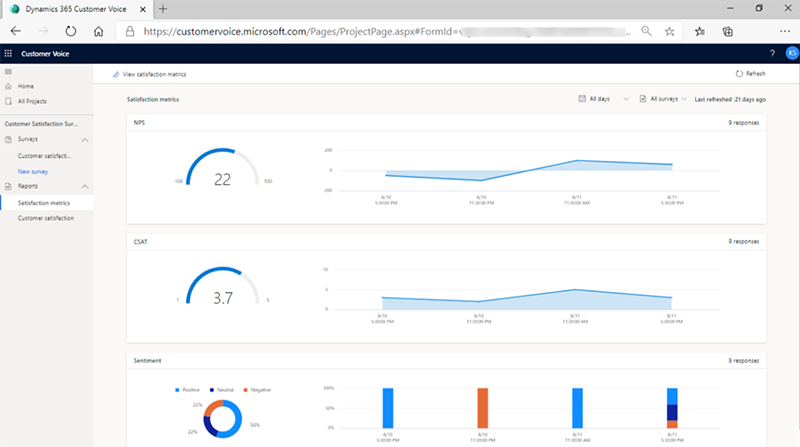
Satisfaction metrics, sentiment analysis, and trend dashboards surface what is actually driving customer feedback, instead of leaving you with a pile of individual responses.
CSAT, NPS, and sentiment metrics tracked automatically
Trend dashboards surface what is changing over time
Combine with Power BI for deeper, cross-survey analysis
Responses link directly to Dynamics 365 accounts, contacts, and cases, so feedback sits alongside the interactions and history it relates to rather than in a disconnected spreadsheet.
Responses tie to the accounts and contacts they came from
Feedback shows up alongside related cases and interactions
Connects natively with Sales, Marketing, and Customer Service
Run and monitor every survey from a single dashboard, comparing satisfaction across departments, products, or regions instead of chasing results team by team.
One dashboard to run and monitor every active survey
Compare satisfaction across departments, products, or regions
Consistent oversight instead of scattered, one-off surveys
At-risk accounts get attention before they churn
Automated alerts and follow-up actions trigger on specific responses, so detractors and at-risk accounts get flagged to the right person fast instead of sitting in a report.
Automated alerts trigger on low scores or key responses
Follow-up actions route to the right person automatically
Detractors and at-risk accounts get caught before they churn
Enterprise security on every response, by default
Customer feedback inherits Microsoft's enterprise security posture and built-in compliance, including GDPR, so every response is handled correctly without extra configuration.
Enterprise-grade Microsoft cloud security on every response
Built-in compliance, including GDPR, out of the box
Available in Government Community Cloud (GCC) environments
See It in Action
What gathering feedback actually looks like
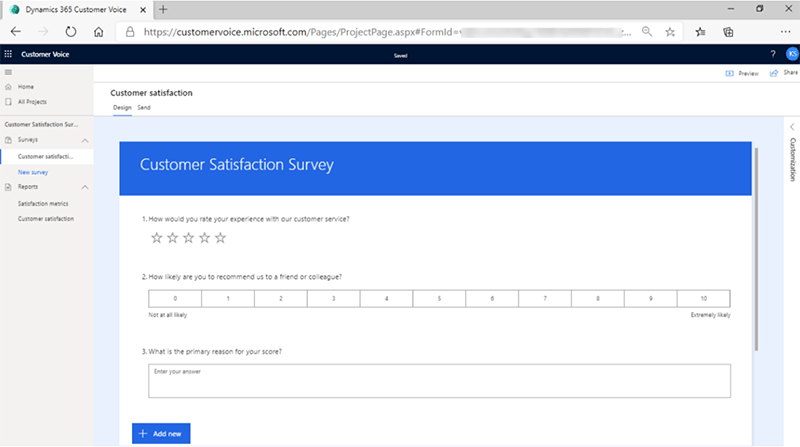
Four ways Customer Voice fits into the way your team already works, from sending a survey to watching results roll in.
Easily Gather Customer Feedback
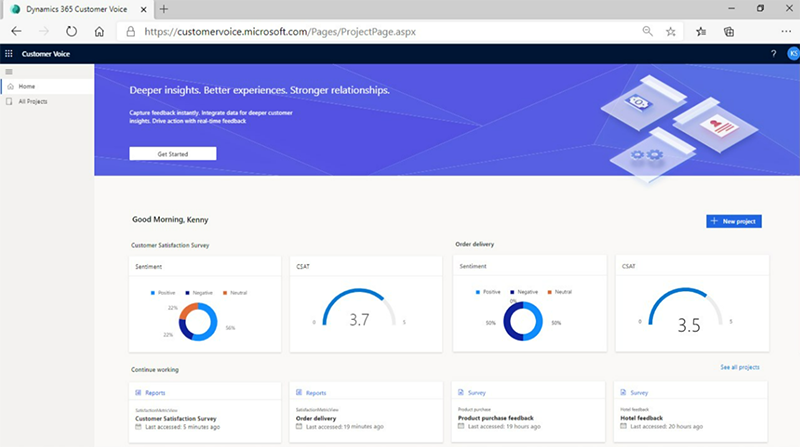
Send surveys across email, web, and links, then collect responses automatically without manual chasing.
Monitor Survey Performance in One Place
A single dashboard tracks response rates, satisfaction, and trends across every survey you run.
Include Surveys in Outlook
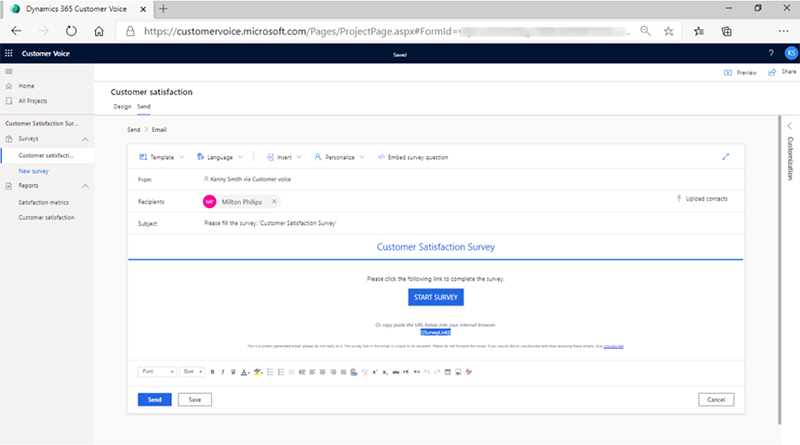
Embed surveys directly in Outlook emails so customers respond without leaving their inbox.
Build Engaging Surveys
Branded, on-tone surveys with branching logic and personalization that drive higher completion rates.
Who It's For
Managers and teams, working from the same feedback
Managers get oversight, security, and follow-up automation. Teams get real-time access to the feedback that helps them serve customers better.
For Managers
Integration with Dynamics 365 Sales, Marketing, and Customer Service for a full view of feedback
Customizable surveys tailored to satisfaction, product feedback, or service performance
Centralized feedback management to monitor and compare performance across teams
Data security and compliance, including GDPR, on every response
Custom alerts and automated follow-up so no important response is overlooked
For Teams
Real-time access to customer feedback so teams respond faster to needs
Customizable dashboards that track the metrics most relevant to each role
Collaboration across sales, marketing, and service on the same feedback data
Easy follow-up with feedback linked directly to Dynamics 365 records
Reduced administrative work through automated collection and integration
Popular Integrations
Connected to the Microsoft tools you already use
Customer Voice works inside the same Microsoft cloud as the rest of your stack, so feedback flows to where your teams already work.
SharePoint
Store, manage, and share survey data and insights securely across the organization, with a central home for feedback, documents, and project files.
Dynamics 365
Link survey feedback directly to customer records in Sales, Marketing, and Customer Service to track feedback alongside interactions.
Power Platform
Automate follow-ups with Power Automate, build custom apps with Power Apps, and visualize results in Power BI dashboards.
Outlook
Embed surveys directly in emails so customers respond from their inbox, with responses tied back to Dynamics 365.
TrellisPoint is a Microsoft Solutions Partner with 17+ years of Dynamics 365 implementation experience. We help you turn Customer Voice from a survey tool into a feedback program that actually changes how your teams respond.
Talk With a Dynamics 365 Customer Voice Specialist
Whether you are launching a feedback program for the first time or trying to get more out of surveys you already run, we start with outcomes, not products. Share your goals and we will respond with practical next steps tailored to your environment.
✓ A direct conversation with a senior consultant focused on your objectives
✓ Clear, outcome-driven recommendations aligned to your feedback goals
✓ A practical roadmap outlining scope, timeline, and next steps
If you do not see your question here, contact us and we will walk through your specific environment.
What is Dynamics 365 Customer Voice?
Dynamics 365 Customer Voice is Microsoft's feedback management tool for creating surveys, capturing real-time responses, and analyzing customer sentiment. It lets organizations build branded surveys, distribute them across email, web, and links, and tie responses directly to Dynamics 365 records so feedback sits alongside the accounts, contacts, and cases it relates to. It is now included with Dynamics 365 enterprise applications rather than sold as a standalone product.
How does Dynamics 365 Customer Voice integrate with other Dynamics 365 applications?
Customer Voice connects natively with Dynamics 365 Sales, Marketing, and Customer Service. Survey responses link to the related customer record, so teams can see feedback in the context of deals, cases, and interactions. Combined with Power Automate, that integration can trigger follow-up tasks, case creation, or alerts the moment a response comes in, turning feedback into action without manual handoffs.
How secure is my customer feedback data in Dynamics 365 Customer Voice?
Customer Voice runs on the Microsoft cloud and inherits its enterprise security posture, including encryption, role-based access control, and built-in compliance with standards such as GDPR. Feedback data is governed by the same identity and admin model as the rest of your Dynamics 365 environment, so you control who can see responses and how long they are retained.
Can Dynamics 365 Customer Voice be used in government organizations?
Yes. Customer Voice is available in Microsoft's Government Community Cloud (GCC) environments, which are designed to meet the compliance and data-handling requirements that public-sector organizations operate under. Availability of specific features can vary by environment, so we confirm the exact capabilities for your tenant during planning.
How quickly can I start collecting feedback with Dynamics 365 Customer Voice?
Because Customer Voice is included with most Dynamics 365 enterprise licenses, many organizations can send a basic survey the same day using a template. A production-ready feedback program, with branded surveys, Dynamics 365 integration, automated follow-ups, and reporting, typically takes a few weeks. TrellisPoint scopes the exact timeline during a short discovery conversation.
What kind of insights can I get from Dynamics 365 Customer Voice?
Customer Voice provides satisfaction metrics (such as CSAT and NPS), sentiment analysis, and trend reporting across surveys and over time. Because responses tie to Dynamics 365 records, you can segment insights by account, region, product, or team, and combine survey data with Power BI for deeper analysis. The result is a clear read on what is driving satisfaction, not just a pile of individual responses.
How does TrellisPoint help with Dynamics 365 Customer Voice implementation?
TrellisPoint handles survey design, Dynamics 365 and Power Platform integration, Outlook and SharePoint setup, automated follow-up workflows, reporting, and user training. As a Microsoft Solutions Partner with 17+ years of Dynamics 365 experience, we focus on turning Customer Voice into a feedback program that actually changes how your teams respond, and we provide ongoing support after go-live.





.png?width=64&height=64&name=Power%20platform%20logo%20(2).png)