D365 projects stall when scope balloons before anyone touches the system. We help you pick the right Accelerator for your team, commit to a fixed price and timeline, and get Copilot in front of your users on day one.
D365 projects stall when scope balloons before anyone touches the system. We help you pick the right Accelerator for your team, commit to a fixed price and timeline, and get Copilot in front of your users on day one.
Connect your apps and services to automate workflows, cut manual effort, and let your team focus on higher-value work. TrellisPoint implements Power Automate around the processes that are actually costing your team time today.
Connect your apps and let the repetitive work happen on its own
Microsoft Power Automate is a cloud-based service that builds automated workflows between the apps and services your team already uses. Low-code cloud flows, AI-driven document and form processing, and robotic process automation for legacy systems all live on one platform, so automation is not a different tool for every problem.
TrellisPoint implements Power Automate around the processes actually slowing your team down, then connects it to Copilot Studio and the rest of the Power Platform as automation needs grow.
AI & Cognitive Services
Process forms, recognize objects, and analyze sentiment inside a workflow instead of a separate tool.
Pre-Built Templates
Start from a template for common workflows, then customize it to fit your exact process.
Scheduled & Triggered Workflows
Run flows on a schedule or fire them off an event, like a new email or an updated record.
Power Automate Capabilities
What Power Automate lets your team do
Six capabilities that turn manual, repetitive work into something that runs on its own. Pick one to see how it plays out.
A workflow that reads a document instead of a person typing it in
AI Builder brings form processing, object recognition, and sentiment analysis directly into a flow, so a workflow can read an invoice or flag a negative review without a separate AI project.
Form processing, object recognition, and sentiment analysis built in
AI runs inside the flow, not as a bolt-on integration
Smarter, more responsive workflows without custom AI development
A workflow that starts itself the moment something happens
Scheduled flows run at set times, and triggered flows fire off a specific event, like a new email, an approval, or an updated record, so automation responds to the business instead of running on a fixed clock only.
Scheduled flows for recurring, predictable tasks
Event-triggered flows that respond the moment something changes
Pre-built templates to get a common workflow running fast
Automation built on the same security posture as the rest of Microsoft cloud
Power Automate runs on Microsoft's secure infrastructure, with data encryption, access controls, and compliance support built in, so scaling automation does not mean scaling risk alongside it.
Data encryption and role-based access controls by default
Compliance support for industry standards out of the box
Governance policies and audit logs to track what automation is doing
Information that moves between departments on its own
A workflow that starts in sales can trigger an action in finance or operations automatically, so information and approvals cross department lines without someone manually forwarding an email.
Workflows that share information and trigger actions across departments
Fewer manual handoffs between teams and systems
Better visibility into where a process actually stands
A system with no API gets automated anyway
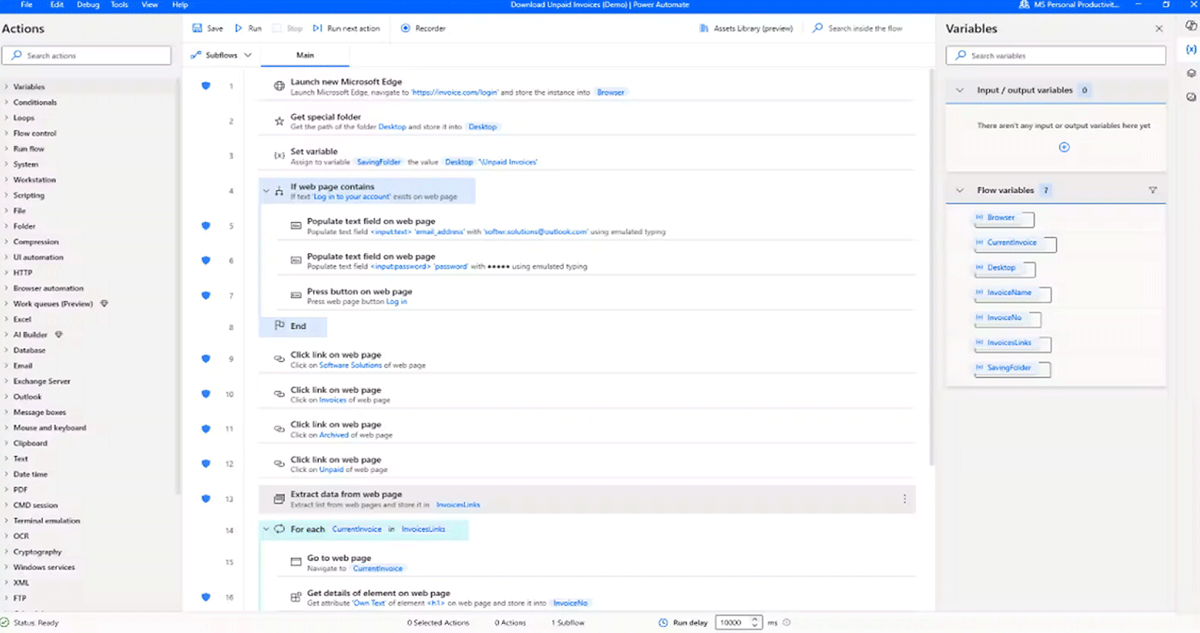
Robotic process automation clicks, types, and reads screens the way a person would, so a legacy application with no modern integration point still gets automated instead of staying a manual step forever.
Prebuilt or custom UI actions automate systems with no API
Legacy applications get automated instead of replaced first
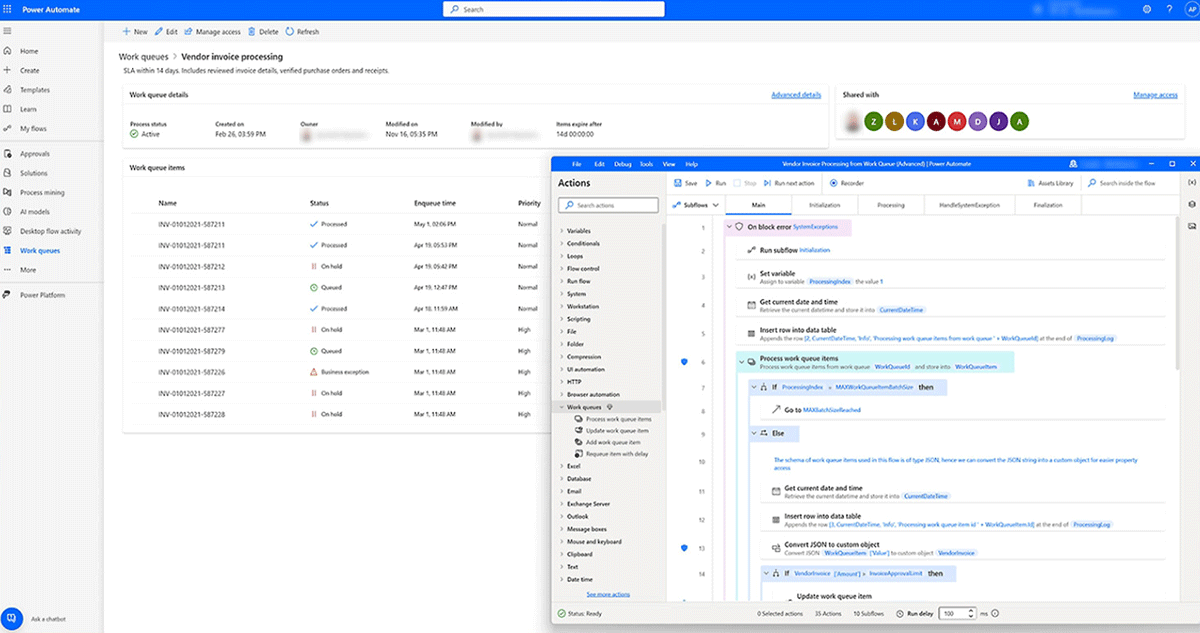
Exception handling and work queues keep unattended bots reliable
A flow built by describing it, not by wiring up every step
Copilot builds a flow from a plain-language description of what you want to happen, sets up the connections, and refines the result through a multi-turn conversation instead of a blank canvas.
Natural-language flow creation from a scenario description
Copilot sets up connections and parameters automatically
Multi-turn conversation to refine a flow instead of a one-shot prompt
Power Automate and AI Builder work together to put intelligence into automation, minimizing the need for manual processing.
Discover Automation Opportunities
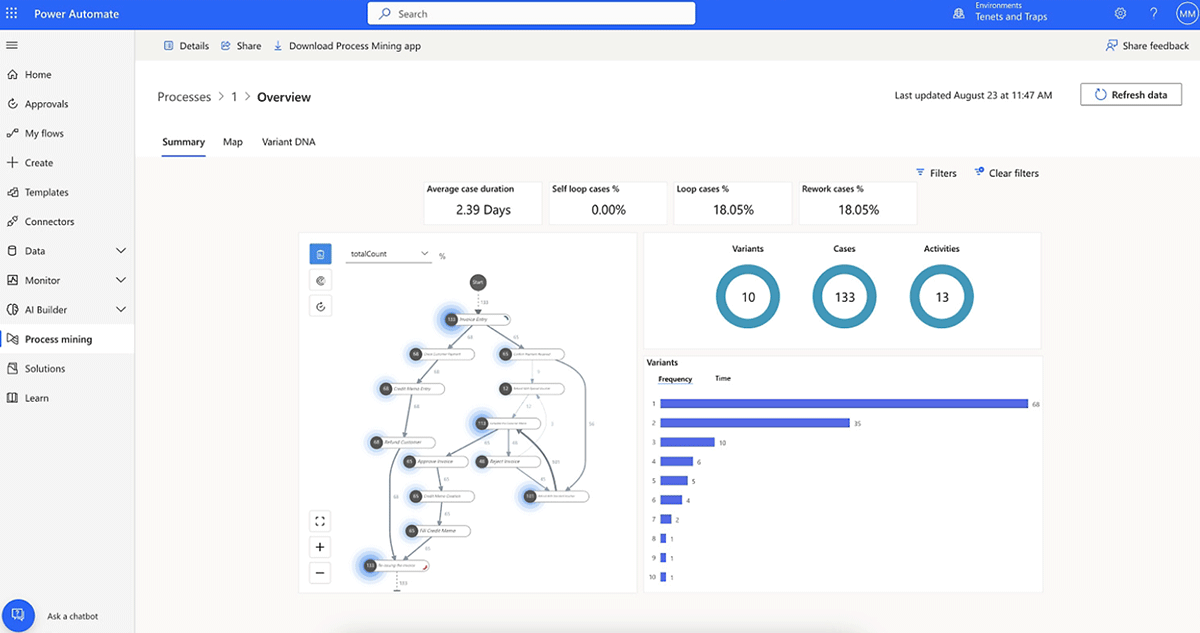
Optimize processes and uncover business automation opportunities with task and process mining.
Automate Legacy Systems
Use robotic process automation (RPA) to automate legacy systems with prebuilt or custom user-interface actions.
Orchestrate Automation Across the Team
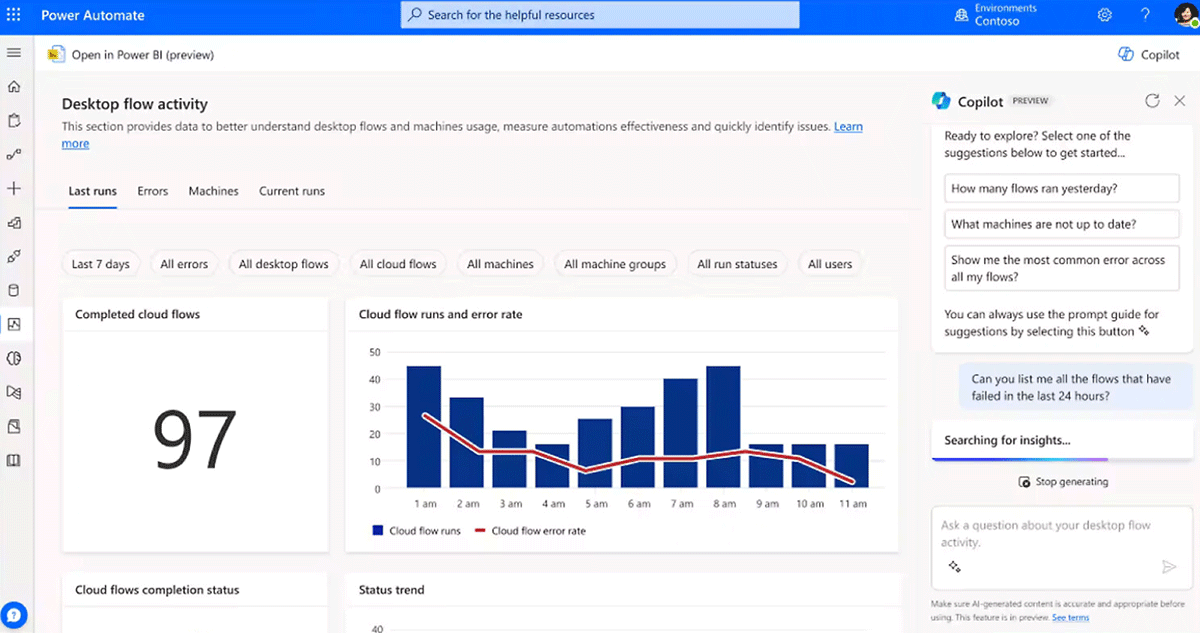
Confidently scale automation across your organization with built-in security, governance, and 360-degree monitoring.
Reliable Automation
Take advantage of superior exception handling, work queues, and the Center of Excellence Copilot experience.
Who It's For
Built for the people who fund automation and the people who use it every day
Managers need proof automation is paying off. Teams need workflows that are simple to build and easy to trust. Power Automate gives both without a second platform.
For Managers
Repetitive tasks and complex workflows automated across departments
Cost efficiency and ROI from reduced manual labor and fewer errors
Integration with hundreds of apps, including Dynamics 365, Microsoft 365, and SharePoint
Security and compliance built on Microsoft's secure infrastructure
Real-time monitoring and analytics to spot bottlenecks and measure efficiency
For Teams
Cross-department collaboration through shared, triggered workflows
On-the-go productivity with a mobile app to manage flows from anywhere
A no-code/low-code platform that empowers non-technical citizen developers
Simplified workflow management through an intuitive, visual interface
Fewer errors and more reliable outcomes, extended further with structured AI rollout as adoption matures
Forrester Total Economic Impact Study
The numbers behind Power Automate
Forrester interviewed organizations running Power Automate and modeled the results as a composite $10B company with 30,000 employees. Read the full study.
248%
Return on Investment
$39.85M
Net Present Value
<6 Months
Payback Period
Popular Integrations
Popular integrations with Power Automate
Because Power Automate lives in the same Microsoft cloud as Office, Dynamics 365, and Azure, most integrations are configuration, not custom development.
Microsoft 365 and Office
Automate common tasks like sending emails, updating spreadsheets, managing SharePoint files, and triggering Teams notifications.
Automate workflows across CRM and ERP systems to streamline sales, customer service, and financial operations.
Azure Services
Azure Logic Apps, Azure AI, and Azure DevOps enable advanced scenarios like AI-driven insights and automated development workflows.
Dataverse
A secure, scalable data model gives Power Automate consistent, reliable access to data across every connected application.
How TrellisPoint Helps
Our Power Automate services
TrellisPoint is a Microsoft Solutions Partner with 17+ years of Microsoft implementation experience. We help you find the processes worth automating first, then build flows that hold up as your automation footprint grows.
Whether you're evaluating Power Automate for the first time, trying to automate a legacy system with no API, or trying to get more out of a system you already have, we start with outcomes, not products. Share your goals and we will respond with practical next steps tailored to your environment.
✓ A direct conversation with a senior consultant focused on your objectives
✓ Clear, outcome-driven recommendations aligned to your business priorities
✓ A practical roadmap outlining scope, timeline, and next steps
If you do not see your question here, contact us and we will walk through your specific environment.
What is Microsoft Power Automate?
Microsoft Power Automate is a cloud-based service that lets users create automated workflows between apps and services. It helps automate repetitive tasks, streamline business processes, and improve productivity by connecting various applications and systems.
How does Power Automate integrate with other Microsoft products?
Power Automate integrates seamlessly with Microsoft products like Office 365, Dynamics 365, SharePoint, OneDrive, and Azure. This lets you automate workflows across multiple platforms, keeping tasks and processes synchronized and efficient.
What types of tasks can be automated with Power Automate?
Power Automate can automate a wide range of tasks, including sending notifications, synchronizing files, collecting data, managing approvals, processing forms, and integrating data between systems. It handles both simple and complex workflows.
Is Power Automate suitable for non-technical users?
Yes. Power Automate is designed with a user-friendly, no-code/low-code interface that lets non-technical users, often called "citizen developers," create and manage workflows. Drag-and-drop features and pre-built templates make automation accessible to everyone.
How secure and compliant is Power Automate?
Power Automate is built on Microsoft's secure cloud infrastructure, with data encryption, role-based access controls, and compliance support for major industry standards. Organizations can also set governance policies to control data access and maintain audit logs that track workflow changes over time.
Can Power Automate be used with third-party applications?
Yes. Power Automate supports integration with a wide range of third-party applications, including Salesforce, Google services, Adobe Sign, and many others, so you can build workflows that connect and automate processes across different platforms.
Can Power Automate be accessed and managed from mobile devices?
Yes. Power Automate offers a mobile app that lets you create, monitor, and manage workflows from a phone or tablet, so automation stays manageable on the go.
What does Power Automate cost, and how is it licensed?
Power Automate is licensed a few different ways: a Per User plan for individual premium access, a Per Flow plan priced for a set of shared flows used across a department, and separate RPA plans for unattended bots. Microsoft 365 E3 and E5 already include Power Automate for standard connectors, so many organizations only need to license the premium connectors or RPA capacity they actually use. Pricing changes periodically, so we confirm current licensing during scoping rather than quoting a number here that may be out of date.
What Copilot capabilities are included in Power Automate?
Copilot builds a flow from a plain-language description of what you want automated, sets up the necessary connections, and refines the result through a multi-turn conversation rather than a blank designer canvas. Newer agent flow capabilities let Copilot evaluate data at runtime and handle exceptions with context instead of a fixed set of rules. Microsoft continues to expand where this shows up, including natural-language workflow creation coming to SharePoint.