Skip to content
TrellisPoint
Dynamics 365 Overview → D365 Accelerators Customer Insights Business Central Customer Service Customer Voice Sales Field Service Project Operations Power Platform Overview → Power BI Power Apps Power Automate Power Pages Copilot & AI Overview → AI Value Engine Copilot Studio Copilot for Service Copilot for Sales Azure Solutions
Microsoft Solutions Partner 17+ Years of
Implementation Experience
Contact Us
Implementation PartnerArtificial Intelligence

Microsoft Copilot Studio

Build custom, secure AI agents for your business. Microsoft Copilot Studio is an end-to-end platform for creating agents using natural language or a graphical interface, tailored to your unique needs, without extensive coding knowledge. TrellisPoint delivers Copilot Studio implementation services that turn that potential into working agents your teams actually use.

IT infrastructure representing custom AI assistant deployment
What Is Copilot Studio?

A platform built to turn business challenges into working AI assistants

Microsoft Copilot Studio is an end-to-end conversational AI platform for building, customizing, and running AI agents tailored to your organization, without extensive coding knowledge. It gives non-technical users a no-code/low-code environment to create agents, while still giving professional developers a code view when they need it. Agents can run standalone or publish directly into Microsoft 365 Copilot, and the platform connects to more than 1,400 external connectors plus Dynamics 365, Microsoft 365, and the rest of the Power Platform.

No-code/low-code agent creation
Build custom AI agents for specific business challenges, from predictive analytics to personalized recommendations, connecting to 1,400+ external connectors.
Real-time team collaboration
Multiple team members can work together on AI projects, sharing insights through Microsoft Teams as they go.
Autonomous and conversational agents
Build agents that hold a natural conversation, or go further with autonomous agents that plan, take action, and escalate on their own.
Enterprise-grade security
Built on Microsoft's secure cloud infrastructure, with encryption, access controls, and compliance built in.
Scales as you grow
Start with one assistant and expand AI initiatives in line with business growth and changing demands.
Multi-channel deployment
Distribute your assistant across websites, social media, and Microsoft Teams from a single build.

Copilot Studio Key Features

Five capabilities behind every Copilot Studio assistant

Pick a capability to see how it plays out day to day.

Build custom AI agents for the challenges only you have

Build custom AI agents that address specific business challenges, from predictive analytics to personalized recommendations, using a no-code/low-code environment that makes AI accessible to non-technical users, with more than 1,400 external connectors to reach your data.

  • No-code/low-code environment for creating and deploying agents quickly
  • Predictive analytics and personalized recommendation models
  • Accessible to business users, not just professional developers

Build AI projects together, and let agents work together too

Copilot Studio supports collaborative AI development, letting multiple team members work together on AI projects and share insights in real time, with AI workflows integrated directly into Microsoft Teams. It also supports multi-agent orchestration, so specialized agents, whether from Microsoft or partner providers, can hand off work to each other on complex processes.

  • Multiple team members contributing to the same AI project
  • Multi-agent orchestration that routes tasks to the right specialized agent
  • AI workflows integrated into Microsoft Teams for seamless communication

Automate the tasks that shouldn't need a person

Automate complex tasks using AI, reducing manual effort and increasing efficiency across your organization. Beyond conversational responses, autonomous agents can plan, take action, and escalate work on their own, and natural language processing lets your agents understand and respond to user queries directly.

  • Autonomous agents that plan, learn, and escalate when needed
  • Complex, multi-step tasks automated end to end
  • Natural language processing for real conversational queries
  • Less manual effort spent on repetitive work

Built on Microsoft's secure cloud infrastructure

Copilot Studio is built on Microsoft's secure cloud infrastructure, offering robust data protection, encryption, and compliance with industry standards, so your AI models and data stay secure and compliant with regulations.

  • Data encryption and access controls on every assistant
  • Compliance with industry standards and regulatory requirements
  • Governed AI development instead of unmanaged shadow AI

Start with one assistant, grow into an AI program

Start small and expand AI initiatives as needed, so your organization can scale its AI capabilities in line with business growth and changing demands, without re-platforming later.

  • Start with a single departmental assistant
  • Expand to enterprise-wide AI initiatives on the same platform
  • Scales in line with business growth, not against it
Product Capabilities

From idea to deployed agent, on one platform

Copilot Studio takes an agent from first idea to a governed, production system in four stages.

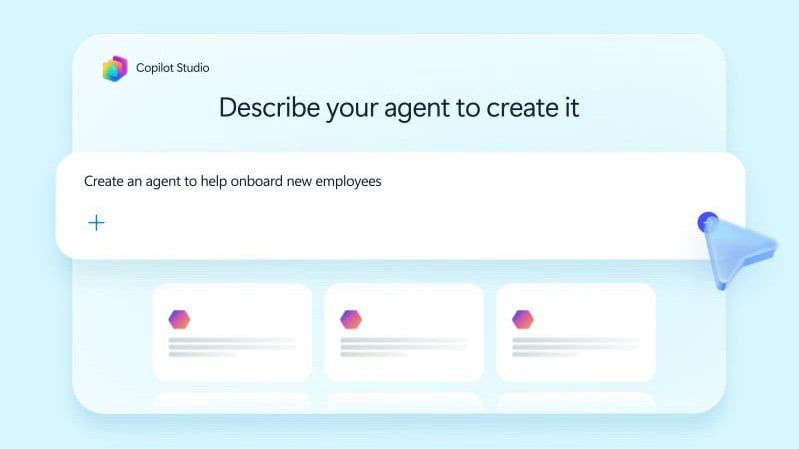
Creating an agent in Copilot Studio
Create

Design conversational agents that answer questions and guide workflows, or go further with autonomous agents, voice agents, and pre-built templates from the Agent Store.

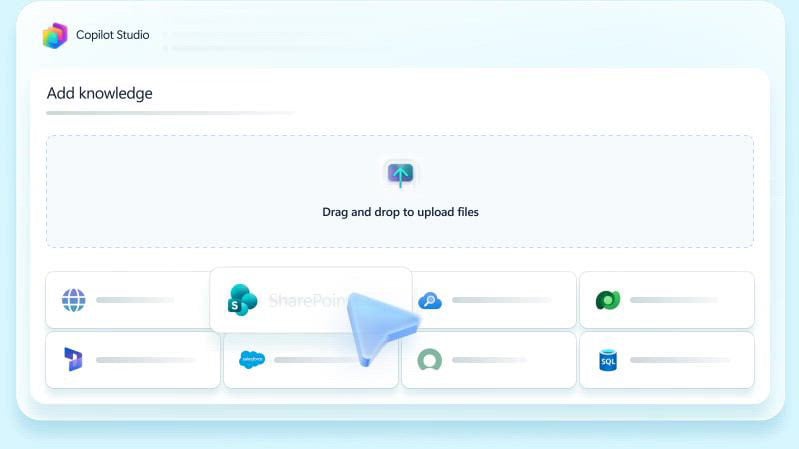
Customizing an agent in Copilot Studio
Customize

Set structured instructions for consistent, accurate responses, connect agents to flows, prompts, and APIs so they can take real action, and orchestrate multiple agents on complex processes.

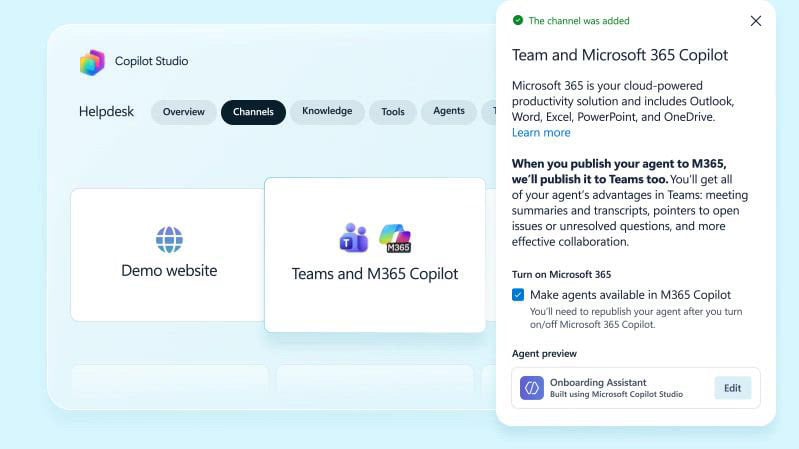
Deploying an agent from Copilot Studio
Deploy

Publish agents directly into the Microsoft 365 apps your teams already use, like Teams and SharePoint, or embed them in websites and social channels for customers.

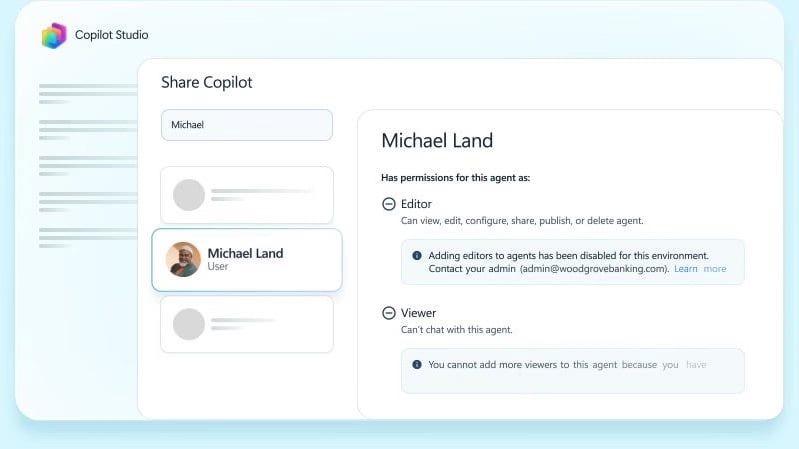
Managing agents in Copilot Studio
Manage

Govern agent creation and spend through the Power Platform admin center, and track adoption, usage, and ROI with built-in analytics and reporting.

Who It's For

Built for the people setting AI strategy and the people using it every day

Managers get governed, scalable AI initiatives. Teams get AI-powered tools that remove routine work from their day.

For Managers

  • Improved customer experience through AI-driven chatbots and virtual assistants that provide personalized responses and support
  • Better decision-making with predictive analytics, using AI models that analyze historical data and forecast trends to identify growth opportunities and risks
  • Customized AI applications built around specific business needs, from automating internal processes to analyzing large datasets
  • Scalable AI solutions that start small and expand in line with business growth and changing demands
  • Data-driven performance monitoring through AI dashboards that track KPIs and business metrics in real time

For Teams

  • Predictive maintenance for IT and operations, using AI agents that monitor systems and flag issues before they cause downtime
  • Dynamic customer segmentation through AI models that group customers by behavior, preferences, and engagement for more targeted marketing
  • AI content generation for marketing copy, customer emails, and social posts, keeping output consistent while reducing time spent writing
  • Automated market analysis that gathers and analyzes market data, tracking competitors and surfacing emerging opportunities
  • AI-powered knowledge management that automatically organizes, tags, and retrieves knowledge so teams find what they need quickly
The Projected Business Case for Copilot Studio

What the numbers could look like

A Forrester New Technology Projected Total Economic Impact study, commissioned by Microsoft (September 2025), modeled three risk-adjusted scenarios for a composite organization deploying Copilot Studio. These are Forrester's projections, not guaranteed results for every organization.

106%
Projected ROI, low-impact scenario
216%
Projected ROI, medium-impact scenario
314%
Projected ROI, high-impact scenario
Popular Integrations

Copilot Studio connects to the tools your organization already runs

Copilot Studio sits inside the Microsoft ecosystem and integrates natively with the platforms your business already depends on.

Microsoft 365 logo

Microsoft 365

Copilot Studio integrates seamlessly with Word, Excel, Outlook, and Teams, automating tasks like drafting emails, analyzing spreadsheet data, and generating content within documents while supporting real-time collaboration.

Dynamics 365 logo

Dynamics 365

Integration with Dynamics 365 lets Copilot Studio enhance CRM and ERP capabilities, automating customer interactions and providing predictive insights into business operations.

Microsoft Power Platform logo

Power Platform

Copilot Studio works well with Power Automate, Power BI, and Power Apps, embedding AI capabilities into automated workflows, data analytics, and custom applications.

SharePoint logo

SharePoint

Copilot Studio integrates with SharePoint to enhance document management and collaboration, automating document classification, content recommendations, and knowledge management.

TrellisPoint consultants collaborating on a Copilot Studio implementation
How TrellisPoint Helps

Our Copilot Studio implementation services

Implementing Microsoft Copilot Studio can revolutionize your business processes, enhance team productivity, and drive innovation. TrellisPoint is a Microsoft Solutions Partner that delivers tailored implementation services so you maximize the potential of this AI-driven platform, not a generic template.

Copilot Studio Implementation
Full setup, AI model design, and deployment tailored to your specific business challenges.
Our structured framework for putting Microsoft AI into production with governance and measurable ROI.
Data Source Integration
Connect your Dynamics 365 data, Microsoft 365, and other systems into a single governed model.
Governance and Security
Access controls and compliance configuration so AI adoption stays governed as it scales.
Training and Adoption
Hands-on enablement so business users and developers actually build and use what gets set up.
Ongoing Support
Continued optimization as your assistants, data sources, and business needs evolve.
Start Here

Talk With a Copilot Studio Specialist About Your Idea

Whether you are building your first AI assistant, trying to get more out of an existing Copilot Studio deployment, or looking to connect it properly to Dynamics 365 and Microsoft 365, we start with your goals, not the product. Share where you are and we will respond with practical next steps for your environment.

  • A direct conversation with a senior consultant focused on your AI idea
  • Honest assessment of what Copilot Studio will and will not solve for your team
  • A practical implementation roadmap with scope, timeline, and next steps

Prefer to call? Reach us at (888) 719-0248.

 
Frequently Asked Questions

Copilot Studio FAQ

If you do not see your question here, contact us and we will walk you through your specific environment.

What is Microsoft Copilot Studio?

Microsoft Copilot Studio is a platform that lets businesses build and deploy custom AI models and assistants tailored to their specific needs. It provides tools for building AI-driven solutions that automate tasks, enhance user interactions, and improve decision-making.

How can Copilot Studio benefit my business?

Copilot Studio lets businesses apply AI across a range of use cases, such as automating repetitive tasks, analyzing data, and improving customer experiences. Integrating AI into your workflows this way increases efficiency, drives innovation, and helps you stay ahead of competitors who haven't.

Is Copilot Studio suitable for non-technical users?

Yes. Copilot Studio offers a no-code/low-code interface that lets non-technical users create and deploy AI models, making AI accessible to a wider range of people across your organization.

How does Copilot Studio integrate with other Microsoft products?

Copilot Studio integrates seamlessly with Microsoft 365, Dynamics 365, and the rest of the Power Platform. That means AI models can be embedded directly into the workflows and systems you already run, rather than living as a separate tool.

How secure is Microsoft Copilot Studio?

Copilot Studio is built on Microsoft's secure cloud infrastructure, offering robust data protection, encryption, and compliance with industry standards. That keeps your AI models and data secure and compliant with the regulations your organization has to meet.

Can Copilot Studio scale with my business?

Yes. Copilot Studio is designed to scale with your business. Whether you're starting with one AI model or expanding into more complex AI-driven solutions across departments, Copilot Studio grows alongside you.

Is Microsoft Power Virtual Agents part of Copilot Studio?

Yes. What was formerly known as Microsoft Power Virtual Agents is now part of Microsoft Copilot Studio, so the same core chatbot-building features are still there, alongside additional capabilities for creating and orchestrating agents.

How does TrellisPoint ensure a successful Copilot Studio implementation?

TrellisPoint follows a comprehensive implementation approach that includes a needs assessment, custom AI agent development, and secure integration with your existing Microsoft investments. Our experienced team ensures a smooth, successful deployment rather than a bolted-on pilot that never reaches production.

How much does Copilot Studio cost?

If your organization already has Microsoft 365 Copilot, Copilot Studio access is included at no extra cost. Standalone Copilot Studio is sold in Copilot Credit packs (25,000 credits per pack) with a pay-as-you-go option also available, and actual spend depends on how many agents you build and how much they're used. Microsoft updates its pricing and packaging from time to time, so we walk through current options as part of a discovery conversation. Visit our Microsoft Licensing page for a closer look at how Copilot Studio licensing fits into your broader Microsoft agreement.