D365 projects stall when scope balloons before anyone touches the system. We help you pick the right Accelerator for your team, commit to a fixed price and timeline, and get Copilot in front of your users on day one.
D365 projects stall when scope balloons before anyone touches the system. We help you pick the right Accelerator for your team, commit to a fixed price and timeline, and get Copilot in front of your users on day one.
Sales teams need every advantage to win. Microsoft Copilot for Sales is an AI-powered assistant that surfaces the right information at the right moment, automates the work that pulls reps away from selling, and connects directly to the Microsoft tools your team already uses every day. TrellisPoint helps you implement it right.
An AI assistant built into the tools your sales team already uses
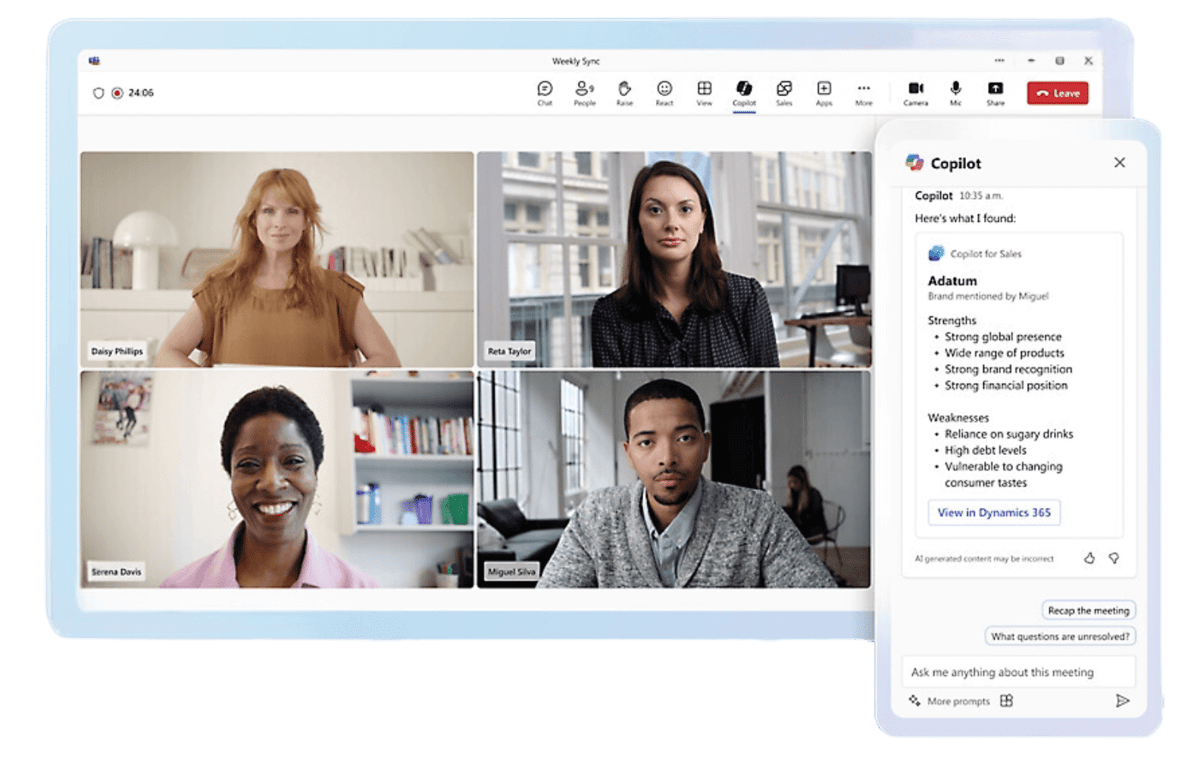
Microsoft Copilot for Sales is an AI-powered sales assistant that works directly inside Microsoft 365 and Dynamics 365 Sales. It surfaces customer context, automates routine tasks, and provides intelligent recommendations without requiring sales reps to leave Outlook or Teams. The platform connects to your CRM, learns from your sales data, and delivers actionable insights at the moments that matter most in a deal cycle.
AI-powered recommendations
Next best actions surfaced automatically from customer data and engagement history.
Works inside Microsoft 365
Copilot surfaces in Outlook, Teams, and Excel where reps spend most of their day.
Pipeline visibility
Real-time deal summaries, risk flags, and forecasting built on your Dynamics 365 data.
Automated follow-ups
Email drafts, reminders, and CRM updates happen automatically so nothing falls through.
Meeting intelligence
Pre-meeting prep briefs and post-meeting summaries saved directly to the CRM record.
Enterprise security
Built on Microsoft's secure cloud with the same compliance posture as the rest of the Microsoft stack.
Copilot for Sales Capabilities
What Copilot for Sales does for your team
Six capabilities that reduce the administrative load on reps and give managers the pipeline clarity to forecast with confidence. Pick one to see how it plays out.
AI-powered suggestions that point reps to the next best action
Copilot surfaces intelligent recommendations pulled from customer data and engagement history, so reps spend their time on the opportunities most likely to move rather than working the list top to bottom.
Next best action surfaced automatically from CRM and engagement data
Recommendations update as new customer activity comes in
Reps focus on high-impact opportunities instead of guessing what's next
Forecasts built on data, not a gut feel in a spreadsheet
AI and machine learning analyze historical sales data to surface patterns and predict future trends, so managers get a defensible forecast without building it by hand.
Historical deal data analyzed for patterns and trends
Forecasts roll up without manual spreadsheet work
Predictions improve as more deal outcomes feed the model
Update records without leaving Outlook or Teams
Access customer records, update pipeline stages, and log interactions from inside Microsoft 365. Dynamics 365 stays current automatically, so reps aren't duplicating work across systems.
Pipeline stages and interactions update from inside Outlook and Teams
Dynamics 365 records stay current without manual re-entry
Follow-up emails and CRM updates that happen without a reminder
Follow-up emails, meeting reminders, and CRM task creation happen automatically after every customer interaction, so no opportunity falls through the cracks.
Follow-up emails drafted automatically after customer interactions
Meeting reminders and CRM tasks created without manual entry
Nothing slips because a rep forgot to log it
One customer record instead of five places to check
Every interaction, email thread, opportunity history, and preference is consolidated into a single customer record, so reps walk into every conversation already prepared.
Interactions, email threads, and opportunity history in one record
Preferences and context available before every call
No time lost piecing together account history from separate systems
Models that improve as your sales process evolves
The AI models inside Copilot for Sales learn continuously from your team's interactions, improving effectiveness over time and adapting as your process changes, without a re-implementation.
AI models improve continuously from real team interactions
Adapts as sales processes, territories, and product lines change
Adding new users or teams is incremental, not a rebuild
See It in Action
Four ways Copilot for Sales shows up in the deal cycle
From summarizing a call to drafting a pitch deck, these are the moments where Copilot for Sales gives reps back time and delivers better outputs than manual work.
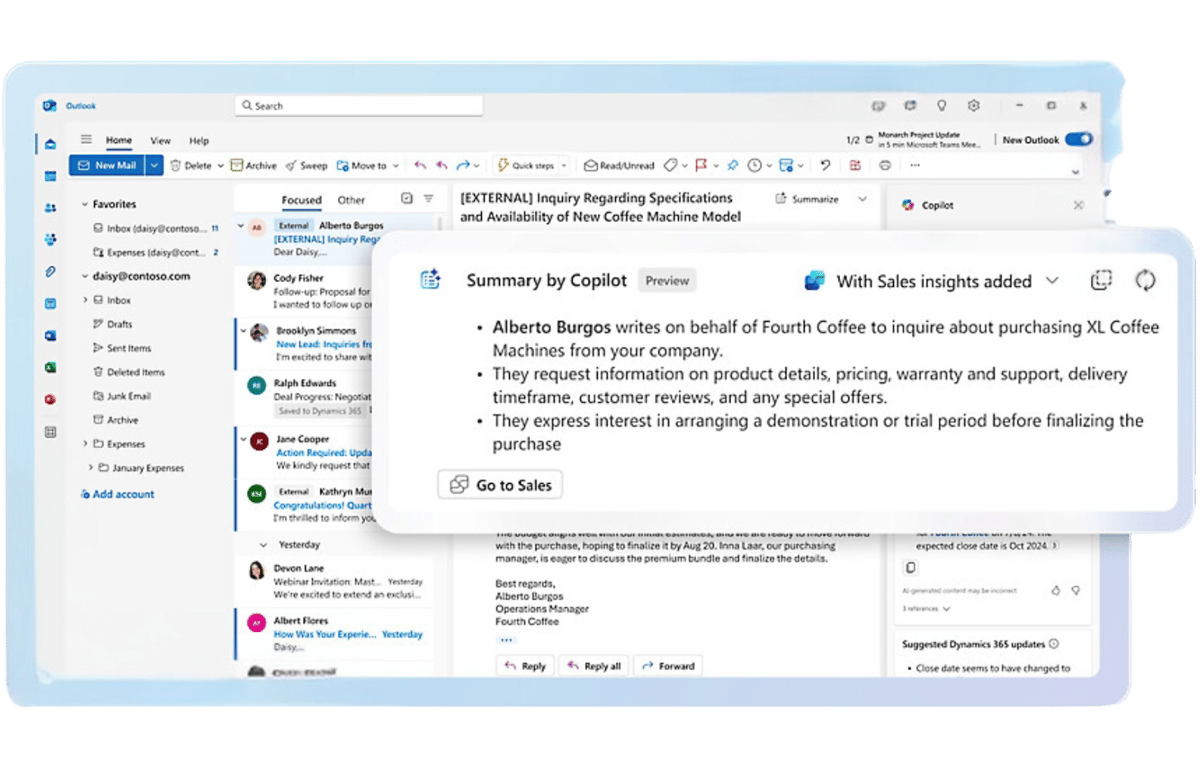
Summarize Information
Create AI-generated email and meeting summaries in Outlook and Microsoft Teams and save them directly to your CRM record with a single click.
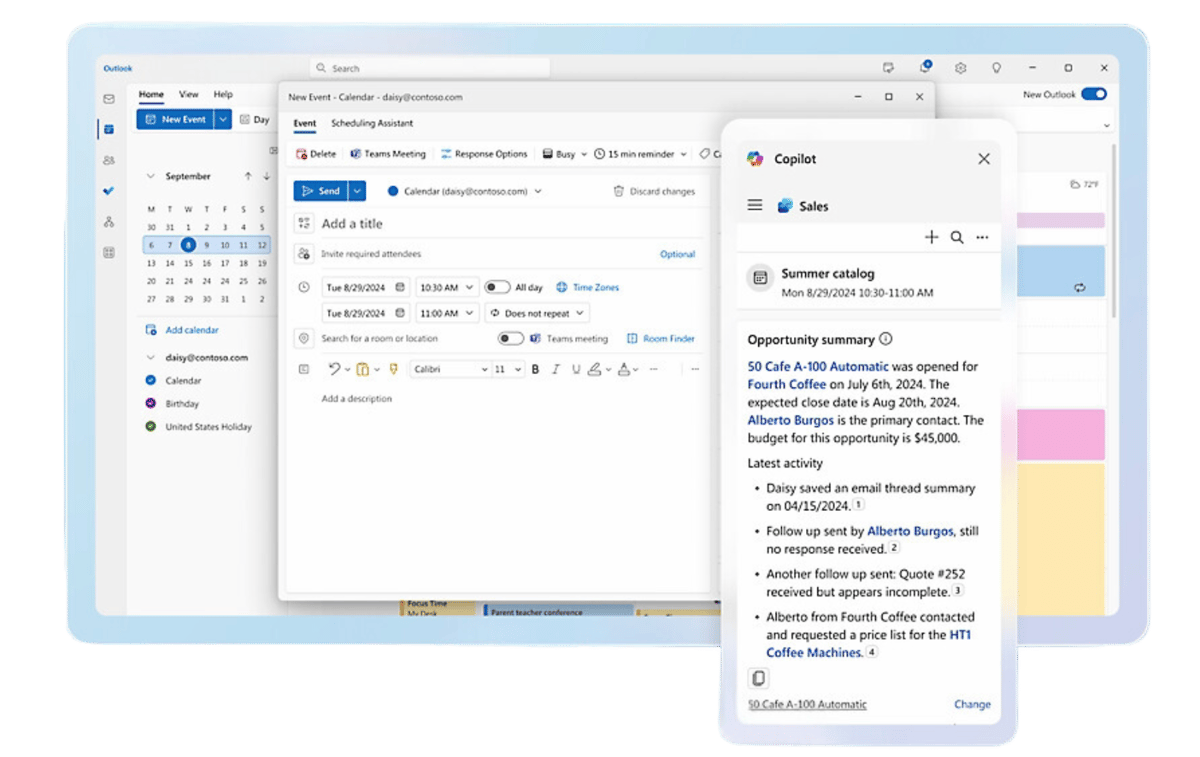
Prepare for Meetings
Surface past meeting notes, emails, opportunity summaries, and related content in Outlook and Teams before every customer conversation.
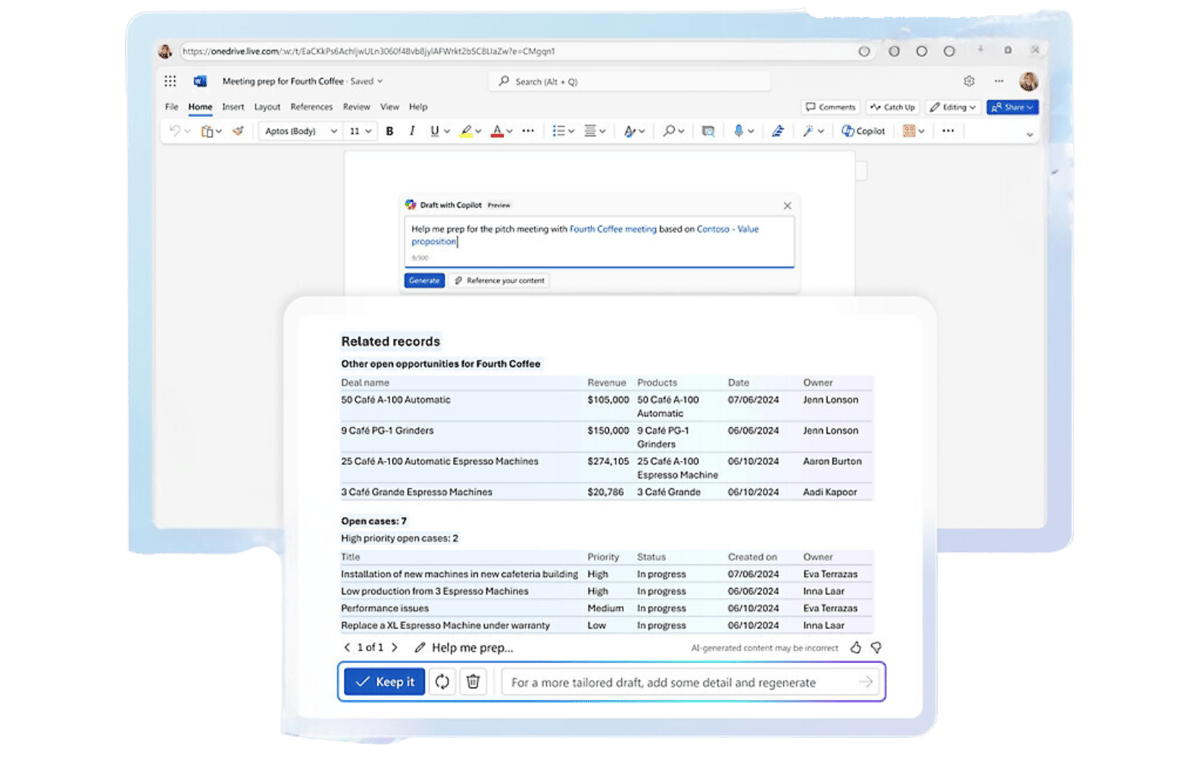
Generate Content
Create pitch decks, meeting preparation briefs, and data visualizations in PowerPoint, Word, and Excel using AI assistance grounded in your customer data.
View Call Analysis
Intelligent meeting recaps including keyword and conversation analysis, competitor mentions, key performance indicators, and suggested tasks, all waiting when the call ends.
Who It's For
Built for sales managers and sales reps, working from the same platform
Managers get pipeline clarity and coaching data. Reps get time back and the right context at the right moment. Both work inside the Microsoft tools they already use.
For Sales Managers
Real-time pipeline view with AI-flagged at-risk deals and momentum signals
Accurate sales forecasts built on historical data, not gut feel
Standardized sales processes and best-practice guidance across the team
Data-driven coaching insights from call analysis and engagement patterns
Complete customer history and preferences surfaced before every meeting
AI-drafted follow-up emails and automated reminders so nothing slips
Less time on data entry, logging, and scheduling, more time on selling
Actionable insights on customer trends, buying signals, and next steps
Faster onboarding with real-time guidance that helps new reps get productive quickly
Popular Integrations
Copilot for Sales connects to the tools you already run
Copilot for Sales sits inside the Microsoft ecosystem and integrates natively with the platforms your team and your IT organization manage today.
Microsoft 365
Copilot surfaces directly in Outlook and Teams, letting reps draft AI-assisted emails, review customer summaries, and update Dynamics 365 Sales records without leaving the apps they live in all day.
Copilot for Sales is fully integrated with Dynamics 365, enhancing CRM capabilities with AI-driven insights and automation. View and update customer records, manage your pipeline, and track every interaction from one place.
Power Automate connects Copilot for Sales data to other business systems. Power BI delivers interactive sales performance dashboards. Power Apps supports custom workflows built on top of your sales data.
Slack
AI-driven sales insights and deal alerts flow directly into Slack channels, helping teams discuss opportunities, share customer intelligence, and coordinate in real time without switching context.
How TrellisPoint Helps
Our Copilot for Sales services
TrellisPoint is a Microsoft Solutions Partner with experience deploying Copilot across sales organizations of all sizes. We configure the platform to fit your process, connect it to your existing Dynamics 365 environment, and make sure your team is actually using it before we consider the engagement done.
Copilot for Sales Implementation
Full setup, configuration, and team enablement tailored to your sales process.
Whether you are evaluating Copilot for Sales for the first time, trying to get more out of an existing deployment, or looking to connect it properly to Dynamics 365, we start with your goals, not the product. Share where you are and we will respond with practical next steps tailored to your environment.
✓ A direct conversation with a senior consultant focused on your sales process
✓ Honest assessment of what Copilot for Sales will and will not solve for your team
✓ A practical implementation roadmap with scope, timeline, and next steps
If you do not see your question here, contact us and we will walk you through your specific environment.
What is Microsoft Copilot for Sales?
Microsoft Copilot for Sales is an AI-powered sales assistant that helps sales teams streamline their processes, automate repetitive tasks, and surface data-driven insights. It integrates directly with Microsoft 365 and Dynamics 365, making it easier for reps to manage customer relationships, prepare for meetings, and close deals, all without leaving the tools they already use.
How can Copilot for Sales improve my sales process?
Copilot for Sales reduces the administrative burden on your reps by automating follow-up emails, meeting reminders, and CRM logging. It provides AI-driven recommendations for next best actions, surfaces customer insights before meetings, and gives managers a real-time view of pipeline health with predictive forecasting. The result is more time selling, better-prepared conversations, and more informed decisions at every level of the organization.
How does Copilot for Sales integrate with other Microsoft products?
Copilot for Sales integrates natively with Microsoft 365 applications including Outlook, Teams, and Excel, as well as Dynamics 365 Sales and the Power Platform. Sales data flows between systems automatically, so reps always have current customer information and managers see a single, accurate pipeline view. No custom middleware or separate dashboards required.
How does Copilot for Sales handle data security?
Copilot for Sales is built on Microsoft's secure cloud infrastructure and carries the same compliance posture as the rest of the Microsoft cloud, including encryption at rest and in transit, role-based access controls, audit logging, and certifications including SOC 2, ISO 27001, and HIPAA-aligned configurations. Customer data stays within your Microsoft tenant and is governed by your existing IT and security policies.
Can Copilot for Sales be scaled as my business grows?
Yes. Copilot for Sales is designed to scale with your organization. The AI models continuously learn from your team's interactions and improve over time. Adding new users, territories, or sales processes is incremental, not a re-implementation. Whether you are expanding regionally or adding new product lines, the platform adapts to changing sales dynamics without starting from scratch.
How does Copilot for Sales help with sales forecasting?
Copilot for Sales uses AI and machine learning to analyze your historical sales data, identify patterns across deals won and lost, and predict future revenue trends. Managers get an accurate, data-driven forecast that surfaces which deals need attention and where revenue is at risk, enabling faster decisions and better resource allocation without manual spreadsheet work.
Can Copilot for Sales help with onboarding new sales reps?
Yes. Copilot for Sales provides real-time guidance and AI-driven recommendations that help new reps learn best practices without a steep learning curve. By surfacing customer context, suggesting next steps, and automating routine tasks, the platform lets new team members focus on learning the sales process rather than the tools. Most organizations see meaningful productivity gains from new hires within the first few weeks.





.png?width=64&height=64&name=Power%20platform%20logo%20(2).png)