Skip to content
TrellisPoint
Dynamics 365 Overview → D365 Accelerators Customer Insights Business Central Customer Service Customer Voice Sales Field Service Project Operations Power Platform Overview → Power BI Power Apps Power Automate Power Pages Copilot & AI Overview → AI Value Engine Copilot Studio Copilot for Service Copilot for Sales Azure Solutions
Microsoft Solutions Partner 17+ Years of
Implementation Experience
Contact Us
Implementation PartnerDynamics 365

Microsoft Dynamics 365 Business Central

The ERP that unifies finance, sales, purchasing, inventory, and operations in one cloud platform, built for teams that have outgrown QuickBooks but don't need the weight of a full enterprise system. TrellisPoint gets you there without disrupting the business you're running today.

Finance team reviewing Business Central data
What Is Business Central?

ERP built for teams that have outgrown QuickBooks, not a full enterprise system

If your finance team is buried in spreadsheets, your operations run on manual processes, and disconnected systems are slowing growth, Dynamics 365 Business Central gives small and midsize businesses one cloud platform for finance, sales, purchasing, inventory, and operations instead of five.

TrellisPoint helps you get there without disrupting day-to-day work. Whether you're modernizing an aging ERP, replacing QuickBooks, or starting fresh, the goal is a right-sized system, not more software than you need.

All-in-One Simplicity
Connect finance, sales, purchasing, inventory, and operations in one system built for SMBs, not bolted-on modules.
Built-In Microsoft 365 Integration
Syncs with Outlook, Excel, and Teams so the tools your team already uses become part of the workflow, not a separate step.
Real-Time Visibility
Track cash flow, profitability, inventory, and project progress without switching between five different tools.
Faster Time to Value
Prebuilt templates, workflows, and integrations mean a shorter path to go-live and a shorter path to ROI.


Business Central Capabilities

What Business Central lets your team do

Six capabilities that turn finance and operations from a spreadsheet exercise into a system of record. Pick one to see how it plays out.

One system of record instead of five reconciled by hand

Finance, sales, purchasing, inventory, and operations run on one data model, so month-end close stops being a reconciliation project across spreadsheets and disconnected tools.

  • One data model across finance, sales, purchasing, and inventory
  • No more exporting from one system to reconcile in another
  • Built for SMBs outgrowing QuickBooks or a patchwork of tools

Financial performance you can see, not a report you have to ask for

Cash flow, profitability, inventory levels, and project progress show up on real-time dashboards, so leadership sees where the business stands without waiting on a monthly report.

  • Real-time dashboards for cash flow, profitability, and inventory
  • Balance sheets and profit/loss available instantly, not at month-end
  • Managers see the numbers without asking finance to pull a report

Bank transactions that match themselves instead of a line-by-line review

Business Central automatically imports and matches bank transactions against your ledger, so close doesn't stall on someone manually checking every deposit and withdrawal.

  • Automatic import and matching of bank transactions
  • Exceptions surface for review instead of every line needing one
  • Cuts month-end close time without adding headcount

Project budgets and hours tracked against the work, not against memory

Built-in project accounting tracks budgets, resources, and time for each project, so cost overruns and schedule risk show up while there's still time to act on them.

  • Budgets, resources, and time tracked at the project level
  • Cost and deadline risk surface early, not at project close
  • Same ledger as the rest of finance, no separate project system

Purchase approvals and vendor cost data in one workflow, not three inboxes

Purchase orders route through built-in approval workflows, and cost tracking by vendor and item surfaces trends so the team can negotiate from data instead of memory.

  • Purchase order approvals and vendor performance tracked in one place
  • Cost tracking by vendor and item to spot trends and negotiate margins
  • No more chasing approvals over email

Outlook, Excel, and Teams as part of the workflow, not a separate step

Business Central syncs natively with Microsoft 365, so quotes, invoices, and approvals happen inside the apps your team already has open, with room to layer in Copilot as adoption matures.

  • Native sync with Outlook, Excel, and Teams
  • Quotes, invoices, and approvals created without switching tools
  • Same identity, security, and admin model as the rest of Microsoft 365
See It in Action

Four screens that show what Business Central actually does

Real Business Central views covering security, opportunity, cash flow, and project profitability, the four areas growth-focused teams ask about most.

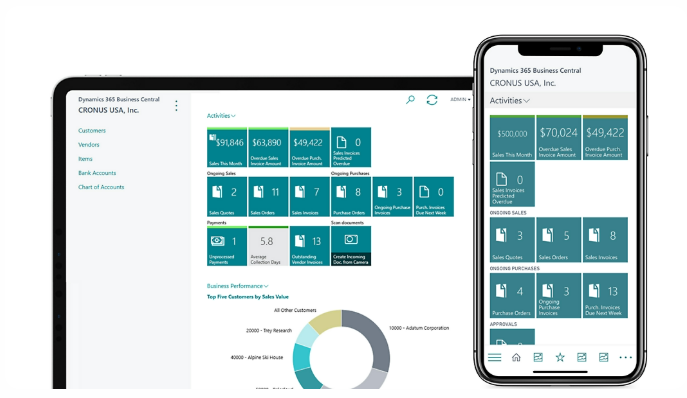
Business Central security and compliance dashboard
World-Class Security & Compliance

Role-based access and audit trails built on Microsoft Azure, so sensitive financial data stays protected as the team grows.

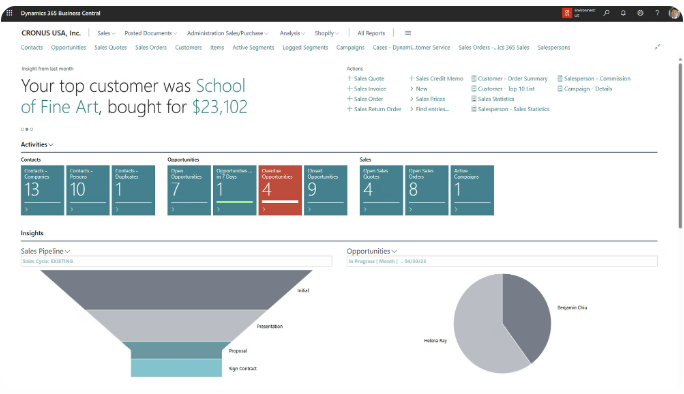
Business Central sales opportunity view
Surface High-Value Opportunities

Sales and purchasing data in one view, so the team can spot the vendor and customer relationships worth pursuing first.

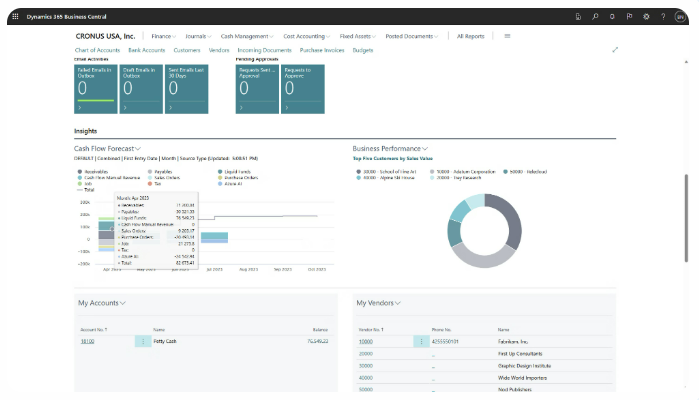
Business Central cash flow forecast view
Forecast Cash Flow

Real-time cash position and forecasting without exporting to a spreadsheet to find the answer.

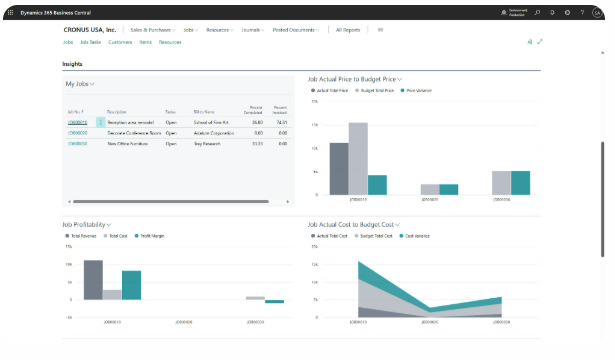
Business Central project profitability dashboard
Drive Project Profitability

Budgets, resources, and time tracked against every project, so cost overruns show up before they become a surprise.

Who It's For

Built for the people managing the business and the people running it day to day

Managers and finance teams need different views of the same data. Business Central gives both without a second system.

For Managers

  • Unified financials and operations, no more reconciling data across five systems
  • Built-in security and audit trails that keep the business compliant and audit-ready
  • Automatic bank integration and reconciliation that cuts month-end close time
  • Built-in project accounting to track budgets, resources, and time by project, backed by a structured implementation
  • Real-time dashboards for financial performance, cash flow, and inventory

For Teams

  • Real-time financial reporting for instant access to balance sheets and profit/loss
  • Vendor management and purchase workflows that replace chasing paper trails
  • Cost tracking by vendor and item to spot trends and negotiate better margins
  • Scenario planning and budgeting tools, paired with structured AI-assisted forecasting as you scale, to test decisions before committing to them
  • Secure role-based access so sensitive data stays protected by default
Popular Integrations

Business Central connects to the Microsoft tools your team already runs

Because Business Central lives in the same Microsoft cloud as Office, Teams, and Power Platform, most integrations are configuration, not custom development.

Power BI

Turns your Business Central data into interactive dashboards and real-time insights for smarter decision-making without exporting to Excel.

Microsoft Teams

Brings financial data into your daily conversations. Share records, approvals, and updates from Business Central directly inside Teams.

Power Automate

Automates repetitive tasks like invoice approvals, payment reminders, and data updates, saving time and reducing manual errors across teams.

Outlook

Lets you create quotes, invoices, and view customer details directly from your inbox. Streamlines sales and service without switching tools.

TrellisPoint Business Central delivery team reviewing an implementation plan
How TrellisPoint Helps

Our Business Central services

TrellisPoint is a Microsoft Solutions Partner with 17+ years of Dynamics 365 implementation experience. We help you get from license to live, then keep the system producing value as the business grows.

Full configuration, data migration, training, and go-live support.
A structured path off QuickBooks or a legacy system, without stalling day-to-day operations.
Connect Business Central to the other systems the business runs on, not just the Microsoft stack.
Right-sized licensing so you pay for the seats and modules the team actually uses.
Process and systems guidance for teams scaling past what spreadsheets and QuickBooks can support.
Structured AI rollout and governance once the finance data itself is trustworthy enough to act on.
Start Here

Talk With a Business Central Specialist

Whether you're evaluating Business Central for the first time, planning a move off QuickBooks, or trying to get more out of a system you already have, we start with outcomes, not products. Share your goals and we will respond with practical next steps tailored to your environment.

  • A direct conversation with a senior consultant focused on your objectives
  • Clear, outcome-driven recommendations aligned to your business priorities
  • A practical roadmap outlining scope, timeline, and next steps

Prefer to talk? Call (888) 719-0248.

 
Frequently Asked Questions

Microsoft D365 Business Central FAQ

If you do not see your question here, contact us and we will walk through your specific environment.

What is Microsoft Dynamics 365 Business Central?

Business Central is Microsoft's cloud-based ERP for small and midsize businesses. It connects finance, sales, purchasing, inventory, and operations in one platform, replacing the spreadsheets and disconnected point tools that most growing companies start with.

Who is Business Central best suited for?

It fits companies that have outgrown QuickBooks or a patchwork of disconnected systems and need more control, automation, and real-time data across departments. Most Business Central customers run somewhere between 10 and 200 employees, in industries from professional services and distribution to light manufacturing and nonprofits.

What does Business Central cost, and how is it licensed?

Microsoft licenses Business Central in three tiers: Essentials for full financials, sales, purchasing, and inventory; Premium, which adds manufacturing and service management; and Team Members, a lower-cost seat for people who mainly need read access and light approvals. List pricing changes periodically, and the right mix of tiers depends on headcount and modules, so we confirm current pricing and licensing during scoping rather than quoting a number here that may be out of date.

What Copilot and AI capabilities are included?

Copilot is included with your Business Central license at no extra cost. It covers day-to-day assistance like bank reconciliation matching and financial analysis in plain language, plus newer agent-based capabilities that can handle end-to-end workflows such as reading and matching vendor invoices, with a person still reviewing before anything posts. Microsoft ships new Copilot capabilities on a regular release cadence, so what is available continues to expand.

Is Business Central secure, compliant, and accessible remotely?

Yes to all three. Business Central runs on Microsoft Azure with enterprise-grade security, regular backups, and compliance with major standards like GDPR and ISO. Because it is fully cloud-based, your team can work from anywhere on any device, which matters for hybrid and distributed teams.

How does Business Central compare to NetSuite or QuickBooks?

Compared to QuickBooks, Business Central adds multi-entity accounting, inventory, purchasing, and project accounting in one system instead of a patchwork of add-ons. Compared to NetSuite, Business Central tends to run lower total cost, with more transparent per-user pricing and tighter native integration with Outlook, Excel, and Teams. NetSuite can make sense for organizations with complex multi-subsidiary or multi-currency needs; most companies evaluating both are better served by Business Central if they already run on Microsoft 365.

Can I migrate from my current system?

Yes. We help migrate data from QuickBooks, legacy ERPs, and spreadsheets with minimal disruption. Your data is cleaned, structured, and migrated securely.