D365 projects stall when scope balloons before anyone touches the system. We help you pick the right Accelerator for your team, commit to a fixed price and timeline, and get Copilot in front of your users on day one.
D365 projects stall when scope balloons before anyone touches the system. We help you pick the right Accelerator for your team, commit to a fixed price and timeline, and get Copilot in front of your users on day one.
AI-driven scheduling, mobile-enabled technicians, and real-time visibility into every job, so your team keeps track, keeps customers happy, and stays on schedule. TrellisPoint implements Field Service around how your dispatchers and technicians actually work.
Keep track, keep customers happy, and stay on schedule
Microsoft Dynamics 365 Field Service is a field service management platform that connects dispatchers, technicians, and customers around the same job data. AI-driven scheduling, mobile access, and asset management replace the whiteboards, spreadsheets, and phone tag most field teams start with. TrellisPoint implements it around how your dispatchers and technicians actually work, not a generic rollout.
Optimized Scheduling & Dispatch
AI-driven scheduling assigns the right technician to the right job, with real-time updates as conditions change.
Enhanced Customer Engagement
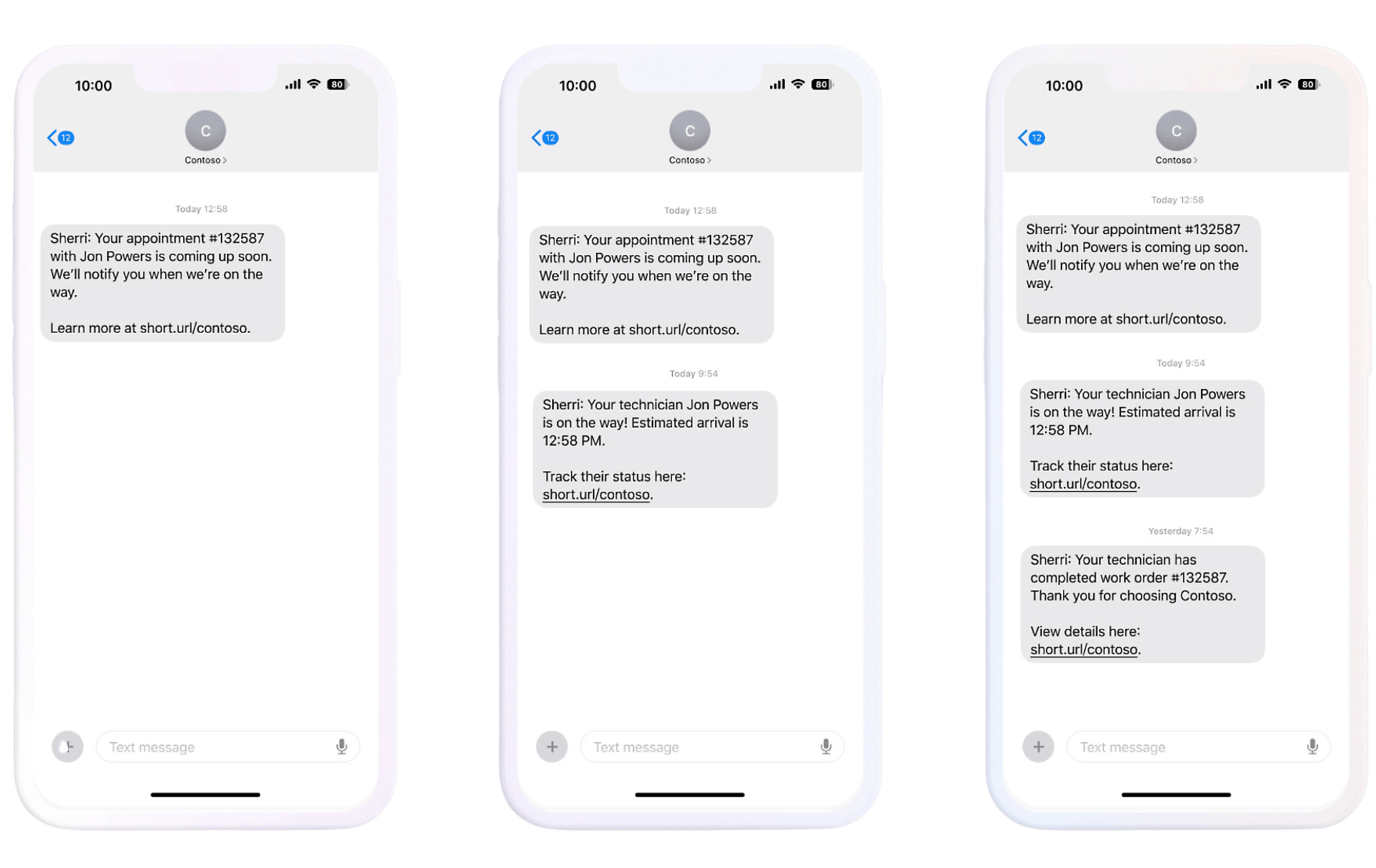
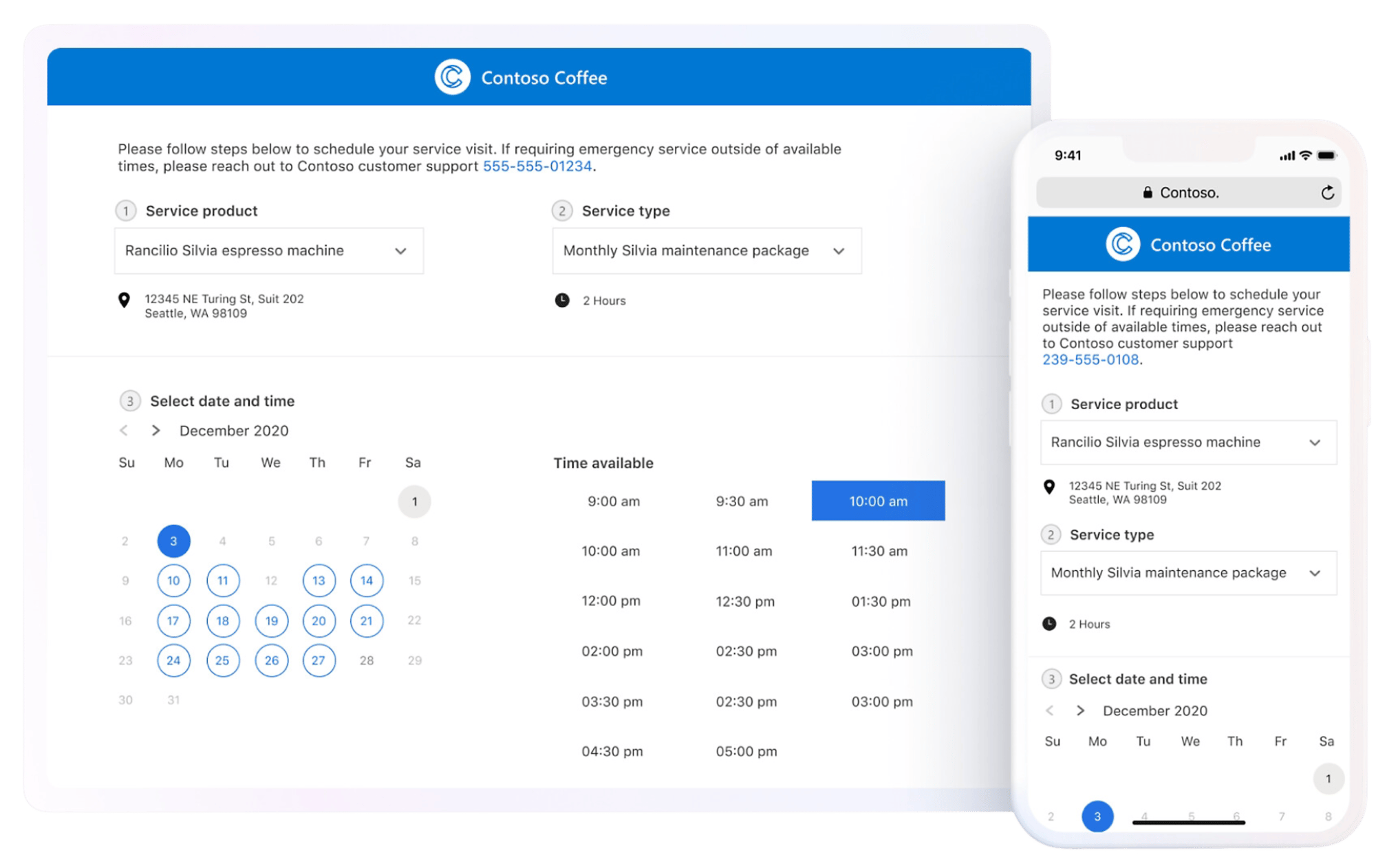
Real-time arrival notifications and self-service booking keep customers informed without a phone call.
Comprehensive Asset Management
Track customer assets and anticipate maintenance with IoT and predictive analytics before something breaks.
Mobile Capabilities
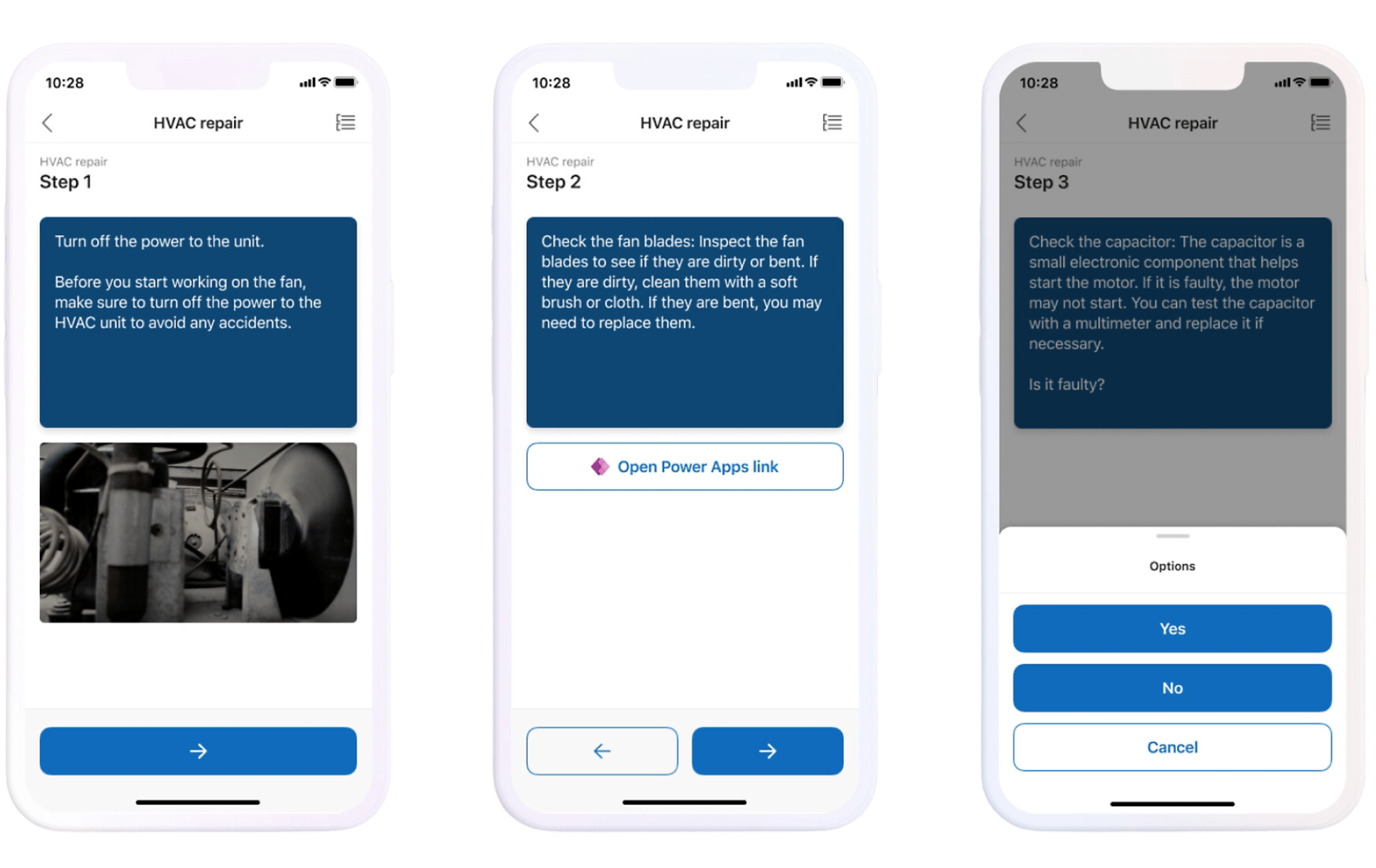
Technicians get service orders, customer history, and troubleshooting guides on mobile, online or off.
Field Service Capabilities
What Field Service lets your team do
Six capabilities that turn scheduling, dispatch, and on-site work into a system dispatchers and technicians actually run on. Pick one to see how it plays out.
The right technician assigned to the right job, automatically
AI-driven scheduling matches technician skill, location, and availability to each job, then adjusts in real time as jobs run long or new work comes in, so dispatchers aren't rebuilding the day by hand.
AI-driven resource matching by skill, location, and availability
Schedules adjust in real time as jobs run long or new work arrives
Less windshield time, more completed jobs per technician per day
Customers who know when the technician is coming, without calling to ask
Automated arrival notifications and self-service portals let customers book, track, and review service without a phone call, and cut down the "where's my technician" calls that eat up a dispatcher's day.
Automated arrival and status notifications by email and text
Self-service booking, tracking, and service history for customers
Fewer inbound status calls landing on dispatch
Equipment that gets serviced before it fails, not after
Connected assets feed IoT sensor data into Field Service, so predictive maintenance flags a failing part before it causes downtime, and every service history stays attached to the asset, not a paper file.
IoT-driven predictive maintenance flags issues before failure
Full asset and service history tracked in one record
Fewer emergency truck rolls, more planned maintenance visits
Everything a technician needs on-site, even with no signal
Work orders, customer history, and troubleshooting guides are available on mobile, and offline functionality means a dead zone in a basement or rural site doesn't stop the job from getting documented.
Mobile access to work orders, customer data, and history on-site
Offline functionality keeps techs working with no connection
Updates sync back automatically once connectivity returns
A senior technician's expertise, without sending a senior technician
Dynamics 365 Guides walks less-experienced technicians through step-by-step instructions on-site, and Remote Assist connects them to an expert over live video when a job needs a second set of eyes.
Step-by-step guided instructions available on-site
Live video support from Remote Assist when a job gets complex
Higher first-time fix rates without adding senior staff to every visit
Work order updates spoken out loud instead of typed in the field
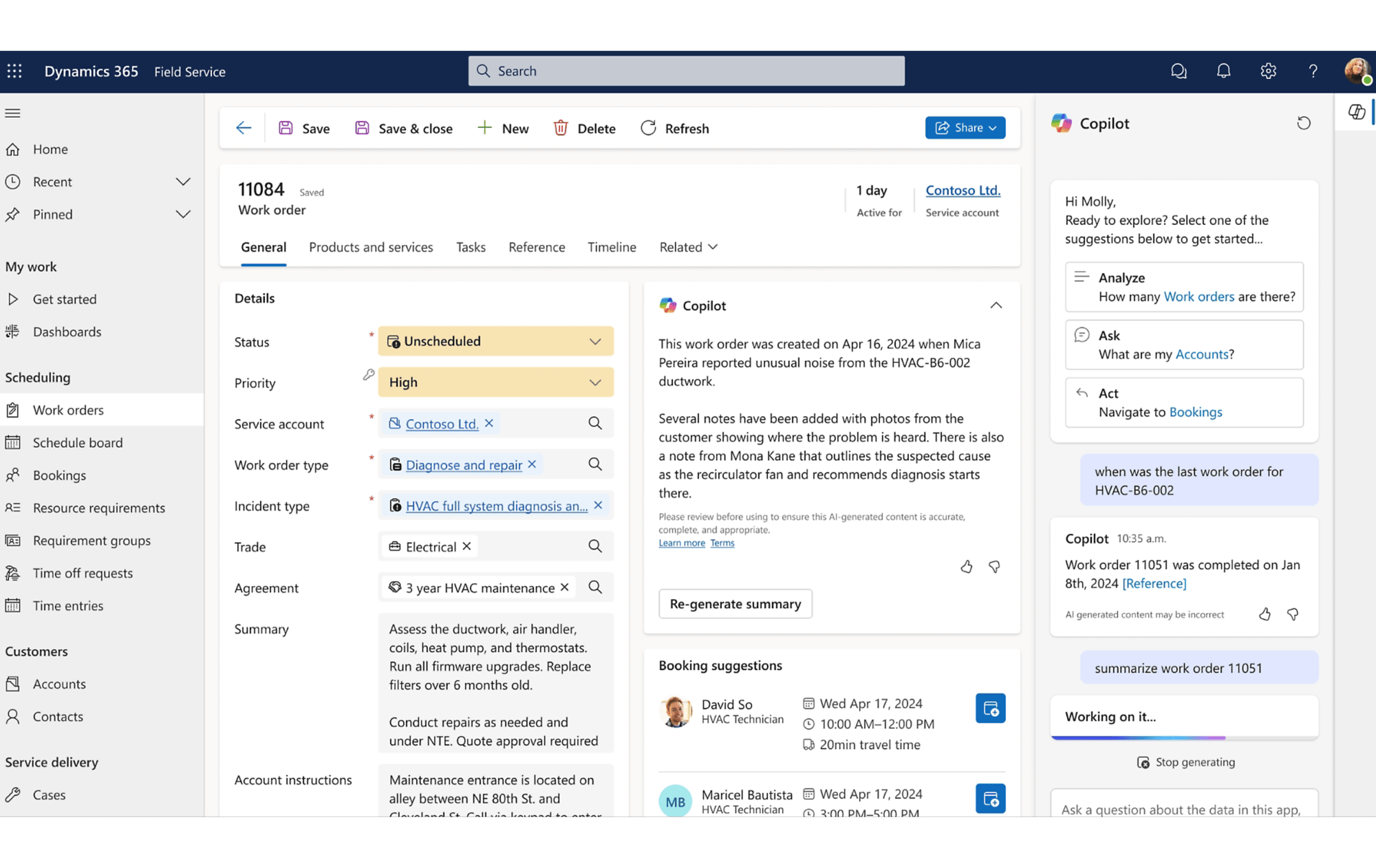
Copilot lets technicians describe work in natural language, by voice or text, and drafts the work order update for review. Dispatchers can ask Copilot to find the nearest qualified technician for an urgent job instead of scanning the board themselves.
Natural-language work order updates from voice or text in the field
Copilot-generated work order summaries before every visit
Dispatchers query Copilot to find the nearest qualified technician
Enhance collaboration between agents, dispatchers, technicians, and customers
Improve your first-time fix rate, complete more service calls per technician per week, manage follow-up work, and take advantage of upsell and cross-sell opportunities.
Automate Communication
Keep customers informed with automated service reminders and notifications via email and text messaging.
Quickly Resolve Issues Remotely
Initiate Dynamics 365 Guides step-by-step instructions, or solve problems in real time with Dynamics 365 Remote Assist.
Provide Post-Engagement Surveys
Gain customer insights by sending automated, personalized surveys after completing field service calls.
Improve Productivity with Copilot
Interact with Copilot to find pertinent information about work orders using natural language.
Who It's For
Built for the people running the schedule and the people out on the job
Managers need visibility across the whole operation. Technicians need everything for the job in front of them. Field Service gives both without a second system.
For Managers
AI-driven scheduling and resource allocation, so the right technician lands the right job
Real-time visibility into technician location, job progress, and service outcomes
Automated customer notifications that cut down status-check calls to dispatch
Workflow automation for work order creation, invoicing, and data entry
Compliance tracking and audit trails to keep field operations aligned to safety and regulatory requirements
For Teams in the Field
Clear job assignments with customer details, location, and service history included
Real-time, offline-capable mobile access to job and customer data
Guided troubleshooting, diagnostics, and a knowledge base on their device
Inventory and parts visibility, so a truck roll doesn't turn into a repeat visit
On-device customer feedback and signature capture at job close
Forrester Total Economic Impact Study
The numbers behind Dynamics 365 Field Service
Forrester interviewed organizations running Dynamics 365 Field Service and modeled the results as a composite $2B company with 1,000 technicians. Read the full study.
346%
Return on Investment
$42.6M
Benefits Present Value
<6 Months
Payback Period
Popular Integrations
Field Service connects to the Microsoft tools your operation already runs
Because Field Service sits in the same Microsoft cloud as Office, Azure, and the Power Platform, most integrations are configuration, not custom development.
Microsoft 365 and Office
Word, Excel, and Outlook handle document management, scheduling, and data analysis, streamlining communication for technicians and managers alike.
Azure Maps and IoT
Azure Maps powers route optimization and territory management, while Azure IoT feeds live equipment sensor data into Field Service for predictive maintenance.
A shared view of service and financial data keeps scheduling, consumption, and billing synchronized between field operations and finance.
How TrellisPoint Helps
Our Field Service services
TrellisPoint is a Microsoft Solutions Partner with 17+ years of Dynamics 365 implementation experience. We help you configure scheduling around your real dispatch patterns, then keep the system producing value as your field operation grows.
Whether you're evaluating Field Service for the first time, replacing a whiteboard-and-spreadsheet dispatch process, or trying to get more out of a system you already have, we start with outcomes, not products. Share your goals and we will respond with practical next steps tailored to your environment.
✓ A direct conversation with a senior consultant focused on your objectives
✓ Clear, outcome-driven recommendations aligned to your business priorities
✓ A practical roadmap outlining scope, timeline, and next steps
If you do not see your question here, contact us and we will walk through your specific environment.
What is Microsoft Dynamics 365 Field Service?
Microsoft Dynamics 365 Field Service is a comprehensive field service management solution that helps businesses optimize scheduling, improve customer engagement, and enhance operational efficiency. It offers AI-driven scheduling, mobile access for technicians, and asset management with predictive maintenance.
How can Dynamics 365 Field Service improve my field operations?
Field Service streamlines scheduling, improves communication with customers, and gives field technicians real-time updates. This leads to quicker issue resolution, higher first-time fix rates, and improved operational efficiency across dispatch and the field.
What Copilot capabilities are included in Field Service?
Copilot lets technicians describe completed work in natural language, by voice or text, and drafts the work order update for review before it posts. It also generates work order summaries so technicians arrive with context, and lets dispatchers ask natural-language questions like which qualified technician is closest to an urgent job. Microsoft continues to expand these capabilities with each release.
Is Dynamics 365 Field Service customizable?
Yes. Field Service offers extensive customization options for scheduling rules, work order types, and mobile forms. TrellisPoint tailors the platform to your dispatch patterns and field service strategy rather than forcing a generic rollout.
How does Dynamics 365 Field Service integrate with other systems?
Field Service integrates natively with Dynamics 365 Customer Service, Business Central, Power BI, and Microsoft 365, plus Azure Maps for routing and Azure IoT for connected assets. Third-party systems typically connect through the Power Platform or a custom integration.
How does Dynamics 365 Field Service help with asset management?
Field Service tracks customer assets and their full service history, and connected assets can feed IoT sensor data in for predictive maintenance. That combination helps reduce equipment downtime and catch problems before they turn into an emergency call.
Can Dynamics 365 Field Service improve customer satisfaction?
Yes. Real-time arrival updates, AI-driven scheduling, and self-service portals mean customers get timelier service and fewer surprises. A Forrester study of Field Service customers found meaningful gains in first-time fix rate and faster response as a direct result.





.png?width=64&height=64&name=Power%20platform%20logo%20(2).png)